
As you are interested in reading my WP Coupons review, I understand that you are eager to install this plugin on your WordPress site to create deals and discount coupons for your readers.
Is this deals creation plugin balanced between the speed, performance, and simplicity? Let’s take a look at this blog post.
I have been using this WordPress Coupon plugin for the past six months, and hence want to share my personal experiences with those who want to create special deals on their websites.
If you run a WordPress blog or affiliate site and promote the deals and discounts of reliable products & services, you already know how important it is to build attractive coupons to boost your affiliate revenue.
Through this unbiased WP Coupons plugin review, I will highlight its impressive features, explain its settings, and compare it with other coupon plugins for WordPress.
Let’s begin with the basic details!
Disclosure: We get a commission when you buy a product via our affiliate link at no additional cost.
Table Of Contents
WP Coupons Plugin – Quick Overview

The Deals and Coupons Lite from WP Coupons is an easy-to-use WordPress plugin that allows you to create and showcase coupons and offers on your site. It has been created by a WordPress expert to help affiliate marketers increase their conversions.
This lightweight add-on loads styles and scripts only when necessary and hence it will not affect your site loading speed. It allows us to place the coupons anywhere on the website, and they work smart on all devices. In simple words, you will get the powerful features of a paid tool without spending a penny.
It was developed by Brian Jackson. However, the current contributors are Anil Agarwal and Nazim Husian from India. I hope the developers will introduce some advanced features and push regular updates soon to ensure compatibility with the latest WordPress versions.
Who is it for?
The Deals and Coupons Lite Plugin is ideal for
- Bloggers and Affiliate marketers who want to share the discount codes in an impressive way and make referral sales
- E-commerce site owners who need to highlight special offers and seasonal discounts to boost affiliate income with coupons.
- Review and content creators who wish to display product recommendations, along with the exclusive code to get loyal readers
Key Features Of WP Coupons That Stand Out
Want to know why WP Coupons is a must-have for your WordPress site? Here are the top 3 features you shouldn’t miss!
Interface
The plugin interface has a good balance between usability and flexibility, thanks to its intuitive user interface. You can follow a clear workflow: Creating Coupons -> Styling -> Display through shortcode/widget. Its admin panel looks neat and organized. It uses your familiar WordPress editor to create the coupons.
Superfast performance
This lightweight plugin doesn’t rely on JavaScript or jQuery, which ensures fast load times. It has no impact on your site speed. I saw that its memory usage is low, as it is optimized for fast superfast performance. If you want to place more coupons or widgets, it can handle the items without slowing down your site.
Attractive Display
You should be aware of the display options available with this plugin. This free plugin offers exceptional coupon display settings such as single coupon embed, Coupon Archive page, Expired offers label, Click to reveal, and Click to copy coupon code. You can completely control the appearance of the coupons.
What I Mostly Like About WP Coupons Plugin?
This responsive coupon plugin lets me treat each coupon as a blog post, and hence, I can add impressive elements to make it attractive. The possibility of including the title, description, category, deadline, call to action, and providing the offer values in a concise format is the best feature of this WordPress extension.
Moreover, I can place the coupons wherever I want, such as in the sidebar, footer, landing page, or blog posts. The way it supports my readers to copy the code, reveal the code by clicking, and take them to the product page through my affiliate URLs (Nofollowed) are a few things I should mention in my deals and coupons plugin review.
And finally, here are some favorable things that I found in this simple plugin for creating coupons!
- Shortcodes and Templates – We don’t have to deal with the coding part; just use the shortcodes and predesigned layouts to display the discount deals.
- Display options – Not only the place where to show the offers! This creative plugin allows us to control the layouts, such as list, grid, or single coupon.
- Customization options – It offers excellent visual controls. We can edit colors, fonts, button text, and box layouts, so it is easy to match the coupon style with the site’s theme and branding.
- Access Control – We can define who can add, edit, or manage coupons through the access settings: Admins, Editors, & Contributors.
I hope you have recognized the WP Coupon features of the Deals and Discounts WordPress plugin. Now, let’s see how to create and customize coupons through its available setting preferences.
How To Create the Coupons Using WP Coupons Plugin?
The Deals and Coupons plugin for WordPress features simple settings, all of which are self-explanatory. Let me tell you where to start!
Go to your WordPress Dashboard> Coupons > Edit the Sample Coupon
On the sample coupon page, you will find all the necessary settings to create coupon codes in WordPress according to your requirements.
Check the plugin settings; all are straightforward, and you can create the coupon in a minute!

In the image below, I have marked the customization areas of the plugin, so it is simple to get the task done.
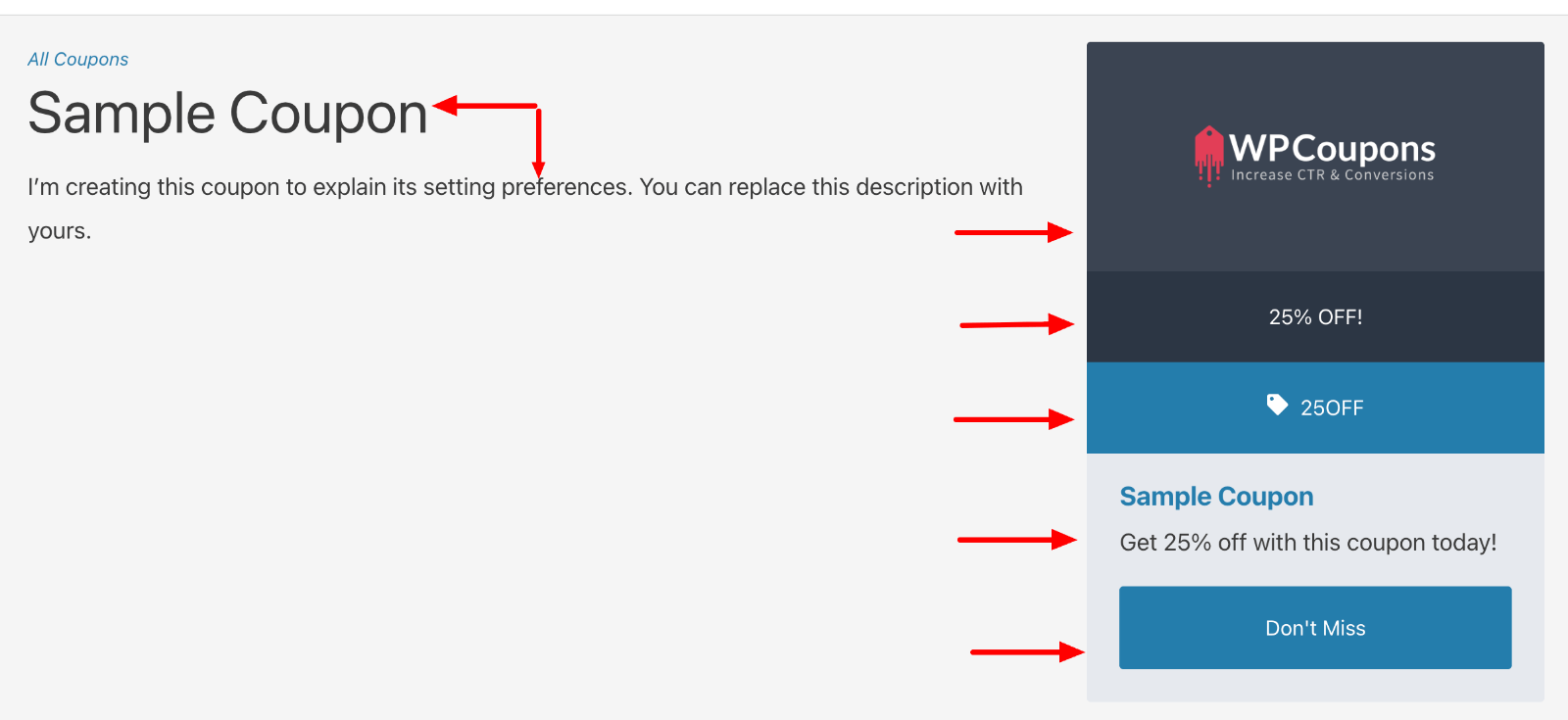
Note: You will also receive the shortcode to place this coupon on a specific page or blog post.
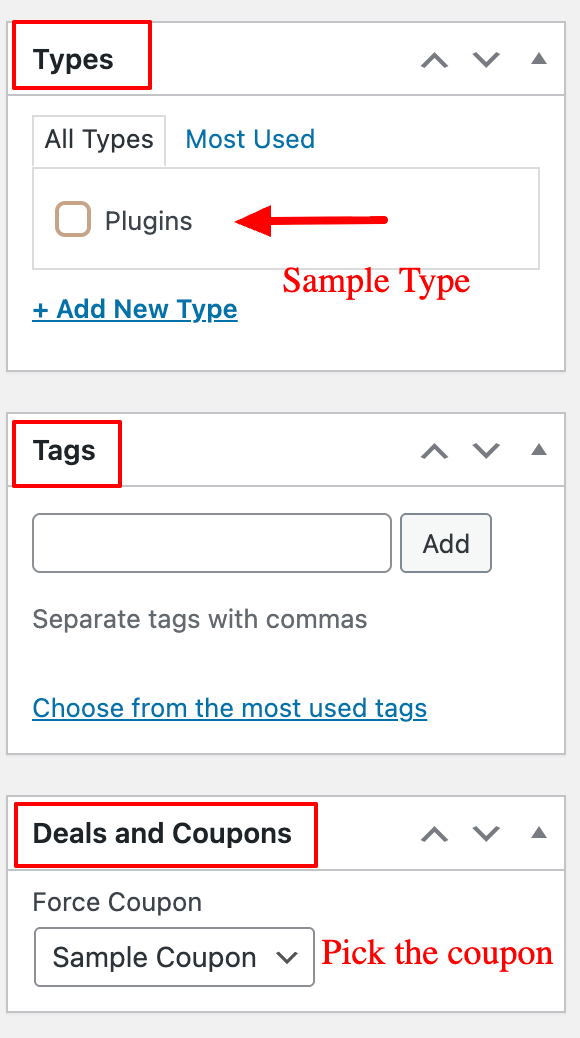
On the right side of the page, several settings are available for further customization, allowing you to add Type & Tags for categorization. Also, pick a specific coupon that you have created through the drop-down menu.
For reference, check the screenshot below.
Deals And Coupons Lite Plugin Settings
Now, let’s see the basic plugin setting options available for the sample coupon that we created. This — Plugin has 3 major settings
- Display
- Styling
- Extra
1. Display Settings
Coupon Archive
It is the top coupon archive shortcode plugin. Go to WordPress Dashboard > Settings > Deals And Discounts, and you will get the following options under the “Coupon Archive” tab.

The purpose of this “Coupon Archive” setting is to resolve the conflict issue between your site theme and the plugin’s archive templates.
If you enable this option, you must fill out the settings as displayed in the image above. You can set up the
- Coupon URL
- Navigation Title & Style
- Number of Layouts
- Sort Order
- Post limit
- Facebook & Twitter image
Single Coupon
Here are the available settings for designing the coupons.
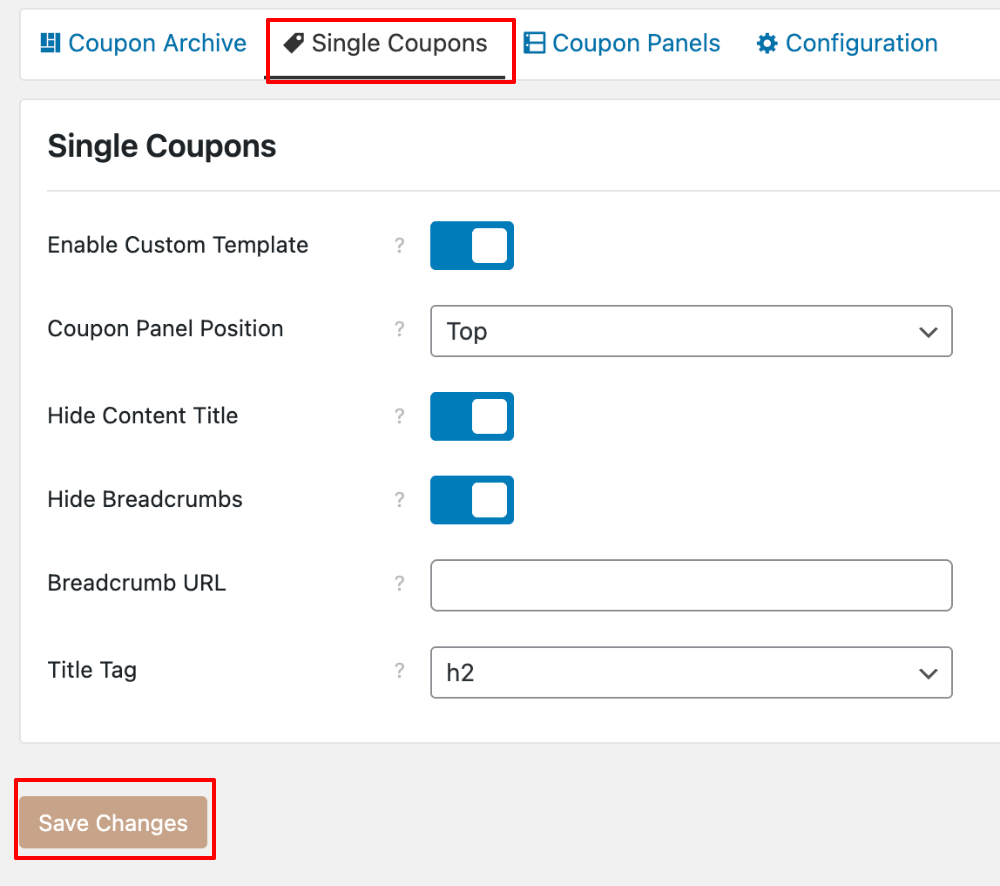
You can
- Change the position of the coupon panel in the single post
- Hide/show the Title and Breadcrumbs
- Fix the Title tag header
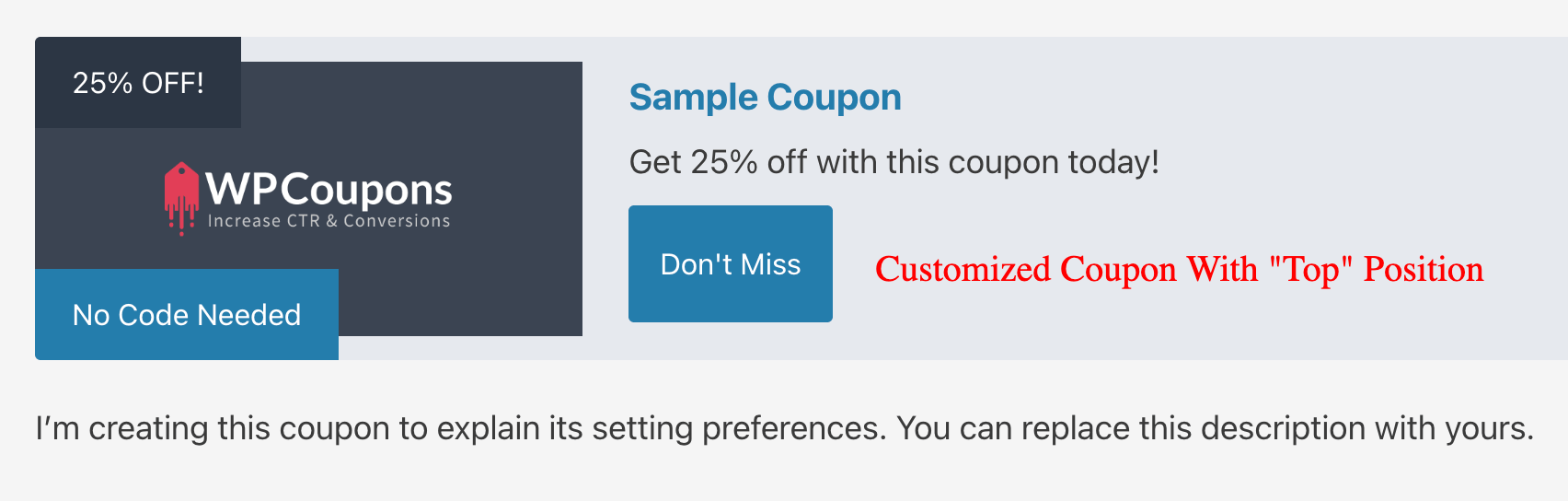
I enabled the options according to my preferences and selected the position “Top“. Check the Coupon output for this custom setting.
Coupon Panel
For deep customization and to present personalized coupons for your site readers, use these settings options. I’m sure that your coupons will get displayed in a clear and attractive format.
Look at the setting choices under this Coupon Panel tab!
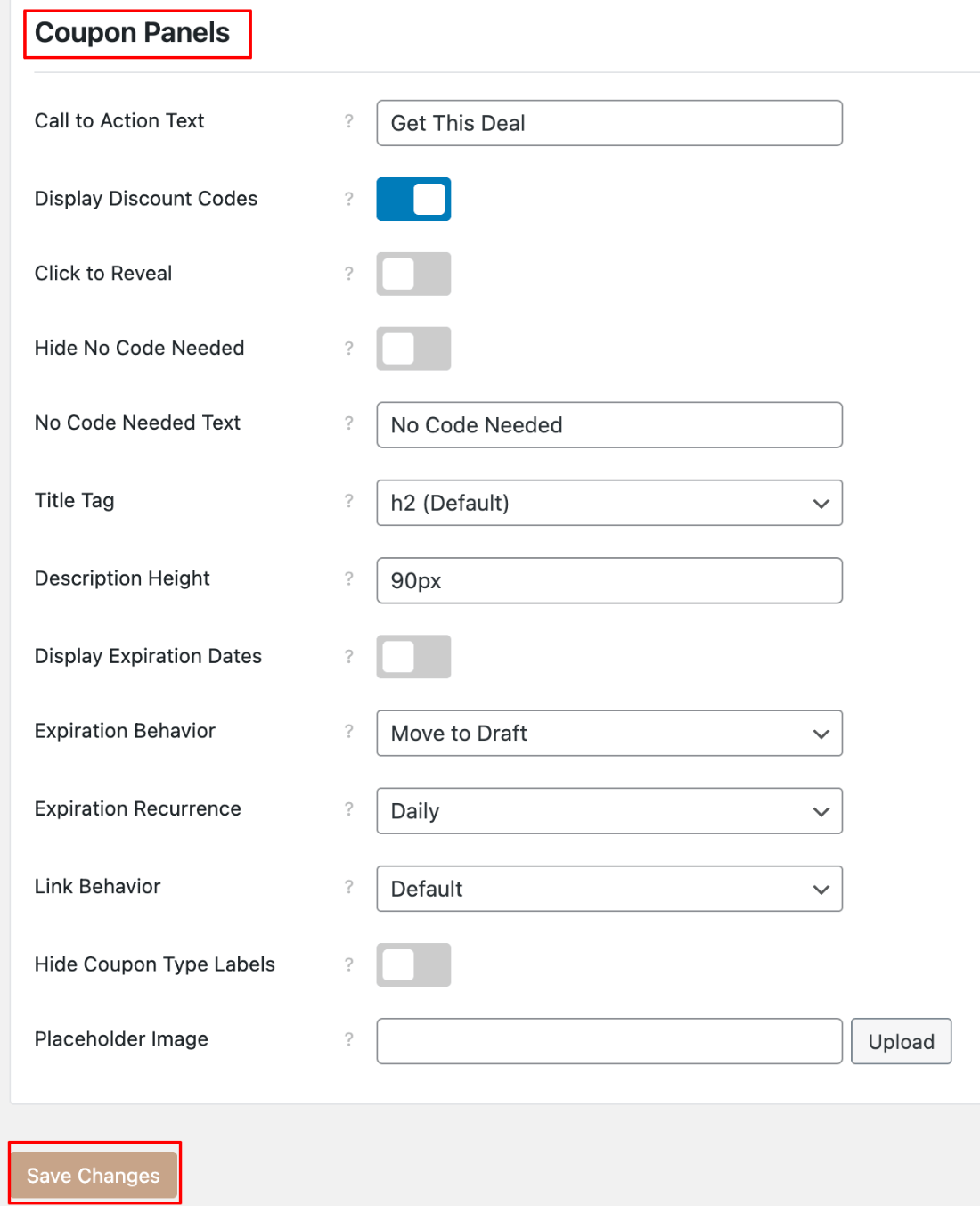
Through these options, you can fix Call to Action, Expiration, link behavior, and much more and make personalised deals for your site audience.
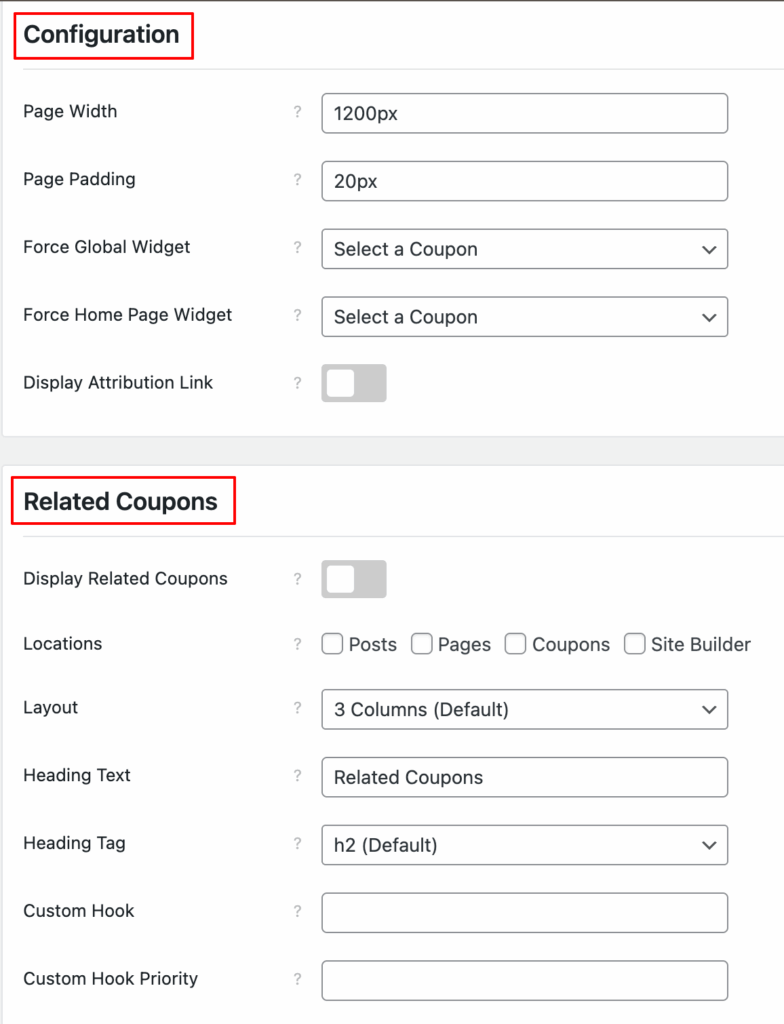
Configuration
It is the final setting under the Display section. Have a glance at the picture below; you will understand the purpose of the available options.
2. Styling
This plugin has detailed styling options for Colors and Fonts. You can create coupons that match the site’s design color and business branding.

3. Extra
Apart from the above customization options, you will get a few more under the “Extra” tab. Look at the choices available.
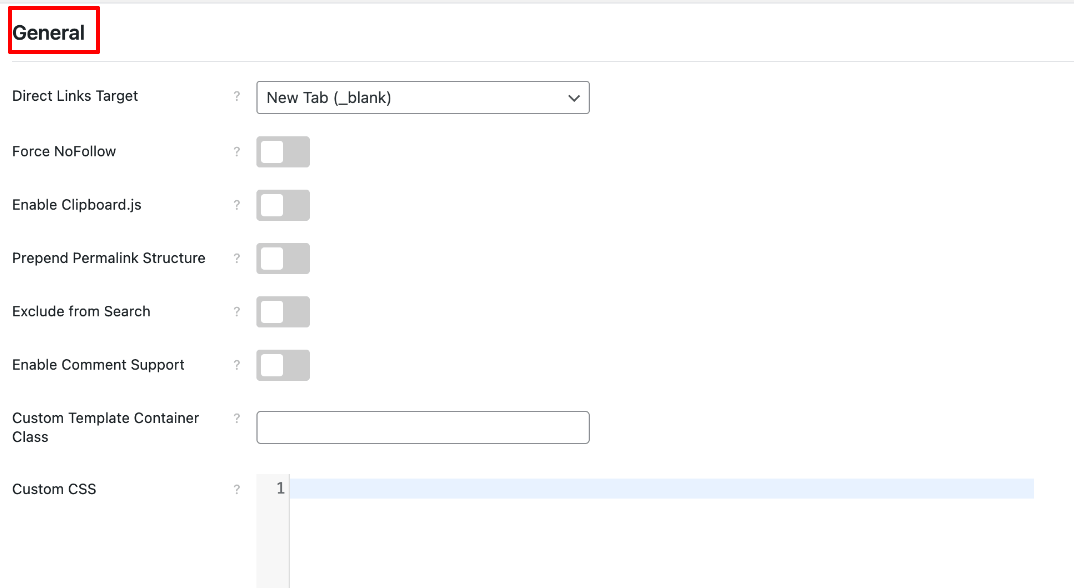
Here, you have the possibility to “Restore the default” and “Import & Export” settings.
I explained all the coupon settings for your easy understanding; the style of customization is your choice.
Pros
- Lightweight and fast; it doesn’t slow down your site.
- Easy to use and beginner-friendly. Self-explanatory settings.
- Multiple display options (shortcodes, widgets, archive pages).
- Customizable colors, layouts, and button text.
- Responsive design that works well on mobile and with any theme.
- Supports “click-to-reveal” and expiration dates for coupons.
Cons
- Limited advanced features compared to the older premium version.
- Not meant for WooCommerce or checkout-based coupons.
Video Tutorial To Set Up Deals And Coupons Lite Plugin
For the WP Coupons setup guide, I’ve created a video. Watch and understand the preferences available to create high-converting deals and discounts for your WordPress affiliate site.
FAQs
Check some commonly asked questions related to this coupon widget for WordPress!
Is WP Coupons’ free plugin compatible with Page Builder and WordPress themes?
Yes! It works well with all the page builders and WordPress themes.
Does the Deals and Coupons WordPress plugin have a pro version?
No! This WordPress coupon plugin doesn’t have a premium version. We can expect some advanced features in the coming days.
How to Change the Appearance of Coupons?
This discount code plugin WordPress has styling settings to customize the coupons. You can also add custom CSS for more in-depth customization.
Can I set the expiration date for the coupons? What happens after it expires?
Yes, you can set an expiration date for each coupon. It will display an expired label after the expiration date, and this can be controlled through the settings. Just leave the date blank if your code doesn’t have any expiry.
What are the best practices to follow while using this Coupon plugin for Affiliate sites?
Follow these for a smooth experience and better display!
1. Use category or tags
2. Utilize “Click To Copy” & “Reveal” settings
3. Test the coupon responsiveness
4. Show all the active deals in one place
5. Ensure the functionality isn’t broken due to your cache.
Wrapping Up
The Deals and Coupons Lite (WP Coupons) plugin is an excellent free solution available for WordPress users who want to install a fast, crisp, and intuitive coupon management system for their business site. It has all the essential features without having any heavy scripts.
If you are a blogger, affiliate marketer, or small business owner looking for a free, functional coupon plugin with premium features, you should have this extension. Its simplicity, performance focus, and core features make it one of the best free coupon plugins for WordPress.
If you need assistance with plugin customization, please contact me at [email protected]. I can help you make personalized coupons for your exclusive deals that blend with your business brand. Share your feedback about this free resource I have created for the dedicated marketers.