

After using Cloudways Vultr hosting for more than 9 years, I’ve come to appreciate its server performance, flexibility, and value in managed cloud hosting. However, there’s one aspect that continues to cause confusion and frustration among users is “Billing.”
I used to spend quality time in Forums, Facebook & LinkedIn groups, and Reddit threads. I have seen some complaints about unexpected charges, confusing invoices, and refund issues, which is a big surprise to me, as I haven’t had any bad experiences paying bills till now.
That’s why I decided to write this post, not to talk anything bad about their server service, but to explain how the Cloudways billing system actually works so that the users can avoid the potential pitfalls in paying the bills and do some routine tasks to avoid overpaying.
As I have been using Cloudways since 2017, I’ll break down everything you need to know about Cloudways billing structure.

Table Of Contents
- Common Cloudways Billing Issues I Have Seen
- What to Do if you use or plan to use Cloudways?
- What Makes Cloudways Billing Unique?
- Cloudways Monthly vs. Hourly Billing
- Billing Models: Pay-As-You-Go vs Hourly
- How Cloudways Scaling Affects Billing?
- What Gets Billed? Breakdown of Charges
- Common Scenarios For Unexpected Charges (Fix Them)
- How to Audit Your Cloudways Invoice?
- How to Avoid Unwanted Charges In Cloudways Billing?
- What to Do If You Were Overcharged?
- Add-On Pricing (Optional but Useful)
- Cloudways Client Billing: For Agencies & Freelancers
- How to Stop Cloudways Billing?
Common Cloudways Billing Issues I Have Seen
Whether you’re a new user or a long-time customer like me, understanding the Cloudways billing structure can help you save money, stay in control, and get the most out of your hosting experience.
| Issue | Description | Difficulty |
| Billing after deletion | Users delete the servers or cancel services, but they still seeing invoices | Users are paying for resources they no longer use |
| Termination/data loss for unpaid bill | Users delete the servers or cancel services, but they are still seeing invoices | Potential catastrophic loss for small errors |
| Unhelpful Support | Long chat/email chains, mechanical replies, and escalations required | Frustrating for users trying to resolve billing errors |
| Refunds are difficult or refused | Users complain that Cloudways won’t honor refunds even when an error is admitted | Monetary loss to the user |
| Demand for grace periods | Users explicitly request more tolerance for late payments | Suggests the current policy is perceived as harsh |
| Disagreement over the billing policy of inactive resources | Users are unaware or disagree that “inactive” servers still incur charges | Surprise invoices, confusion over terms |
These are all the problems discussed by the users in the community groups. So, let me give some useful suggestions to avoid these difficulties.
What to Do if you use or plan to use Cloudways?
Based on what users are reporting, I suggest you do the following!
When you delete servers, check your next invoice carefully
Problem – Don’t assume deletion means zero charge immediately. Users say “deleted server” changes don’t always prevent later invoices (e.g., phantom billing).
Solution – Always keep evidence (timestamps, support chats) if you delete early.
Be cautious about even small overdue amounts
Problem – Even a $10–$15 unpaid balance may trigger server deletion in some cases, with backups removed.
Solution – If your billing method fails (card expiry, insufficient funds), it’s safer to contact support.
Have backups outside Cloudways
Problem – Many users report that once their account or servers are deleted, their backups (even Cloudways’ backups) are removed.
Solution – Maintain independent backups to avoid total loss.
Document and escalate billing disputes
Problem – Given the reports of poor support responsiveness, escalate if needed (email billing@, open support tickets).
Solution – Use chargeback/dispute channels (credit card, PayPal) if you believe the billing is erroneous and you can’t get a resolution.
Watch “inactive resource” billing policies
Problem – Cloudways own documentation states that on certain providers (DigitalOcean, Linode, Vultr), inactive (stopped) servers still incur charges because hardware is allocated.
Solution – Understand whether your specific server type is billed even when “stopped” (versus completely deleted).
Check for hidden/add-on charges
Problem– Users complain of add-on charges (backups, extra bandwidth) that they say weren’t clearly disclosed.
Solution – Review invoice line items carefully. Ask the support team for itemized breakdowns.
Grace periods may not exist
Problem – Based on user complaints, Cloudways will not offer long grace periods and proceed to stop/delete servers after a few days of nonpayment.
Solution – If you expect delays (e.g., card renewals), proactively communicate with support.
If you’re hosting your website on Cloudways or planning to migrate, you should understand how their billing system works.
What Makes Cloudways Billing Unique?
Whether you’re just starting out or managing multiple websites, their billing model will be comfortable for you!
Unlike traditional shared hosting providers (like SiteGround or Bluehost), Cloudways acts as a managed hosting layer on top of third-party infrastructure providers like DigitalOcean, Vultr, AWS, Google Cloud, and Linode.
You’re renting these servers on an hourly or monthly basis, and Cloudways handles the setup, dashboard, and technical optimization. You can scale up, pause, or delete servers as needed. You don’t need to do anything at the server level.
Cloudways Monthly vs. Hourly Billing
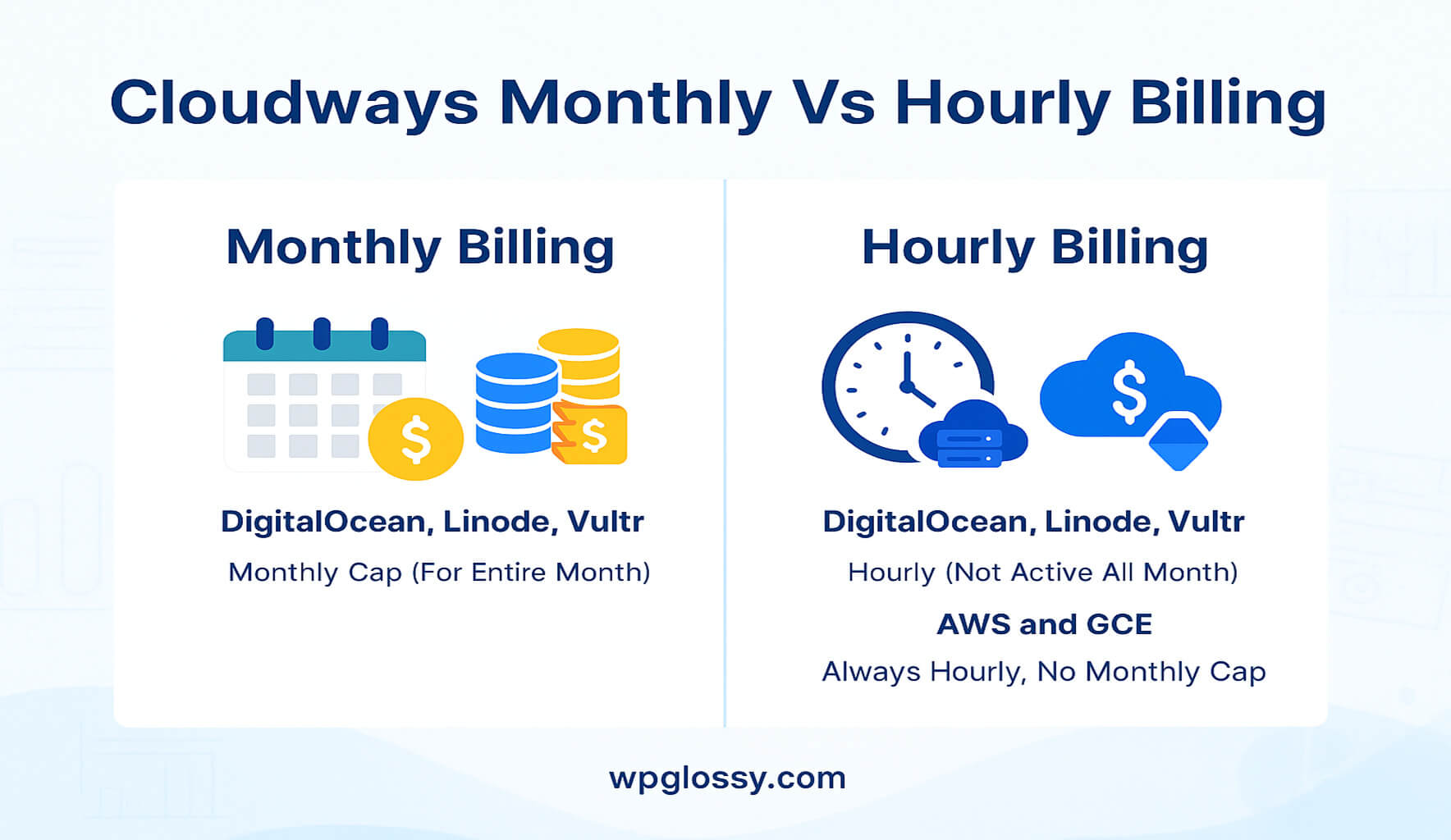
Cloudways charges based on whichever is higher:
- The number of hours your server was active during the month
- Or the fixed monthly rate for that server
So if you only used a server for 5 days (120 hours), you’ll be billed at the hourly rate. But if it runs the whole month, you’ll pay the full monthly cap.
Billing Models: Pay-As-You-Go vs Hourly
Cloudways offers two primary billing models depending on how and when you scale your servers.
1. Monthly Pay-As-You-Go
If you plan to use DigitalOcean, Vultr, and Linode servers regularly, pick this billing model!
- Billed in arrears (you pay for last month’s usage)
- Invoices are generated between the 1st and 6th of the following month
- Charges include server cost, storage, bandwidth, backups, and add-ons
2. Hourly Billing
In Cloudways, AWS and Google Cloud charge you on an hourly basis. Neither cloud server has the monthly payment options. You may also go with this hourly pricing for the other three cloud servers.
- Active server hours are tracked and charged hourly
- Ideal for testing or short-term development projects
- Billing stops when the server is deleted
How Cloudways Scaling Affects Billing?
If you scale your server before the 28th, Cloudways charges for both configurations, based on hourly usage. If scaled after the 28th, you’re billed for the upgraded configuration for the full month.
Example Calculation:
Server X scaled on 20th. You’ll be charged:
- Server X (old) for 19 days (hourly)
- Server X (new config) from 20th–30th (hourly)
What Gets Billed? Breakdown of Charges
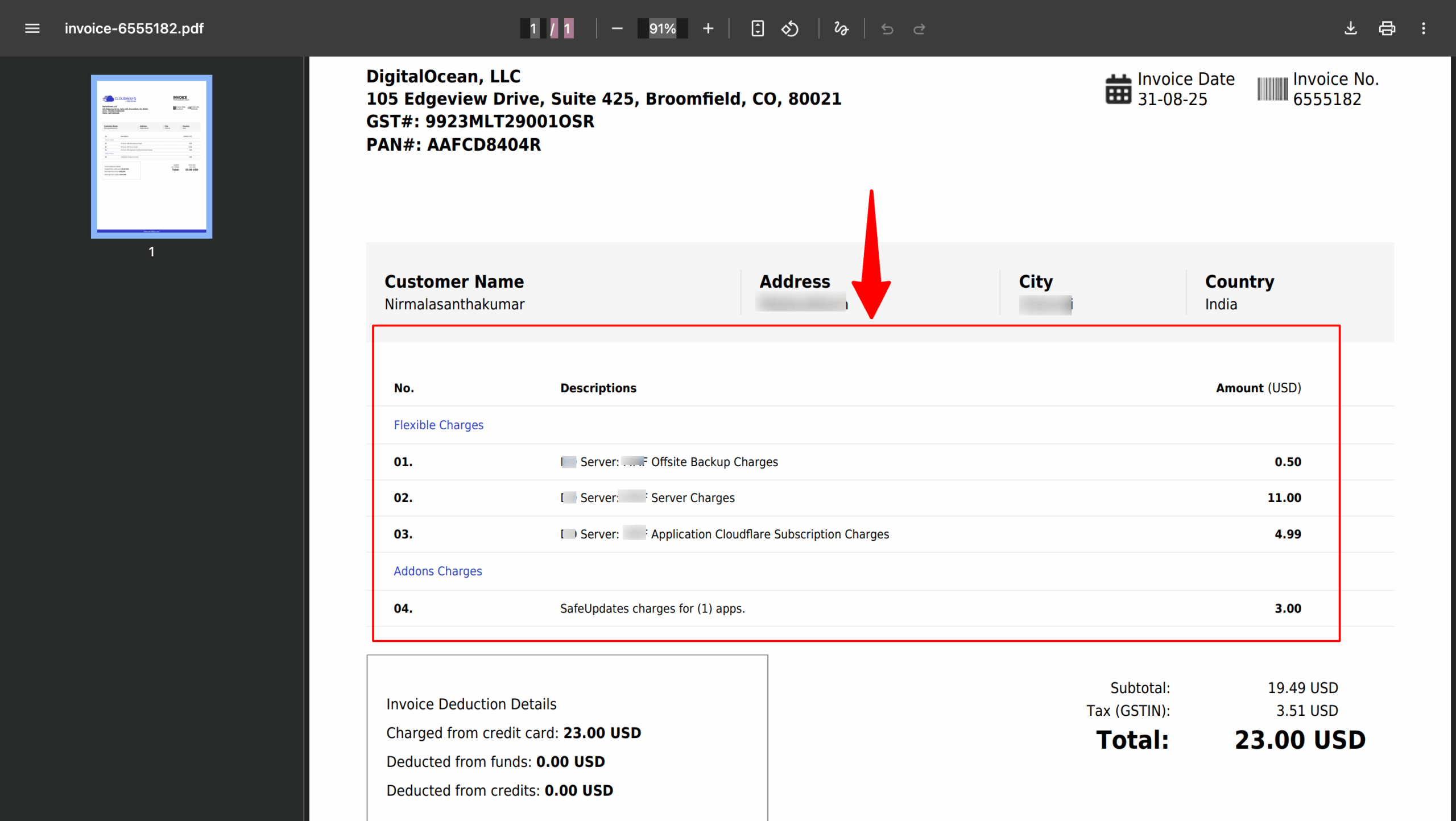
In your Cloudways invoice, you will see:
| Charge Type | Description |
| Server Usage | Based on hours used (DigitalOcean, Vultr, etc.) |
| Backup Storage | Off-site backups are charged per GB |
| Bandwidth Overages | If you exceed the allocated traffic limits |
| Premium Add-Ons | premium support or SMTP add-ons |
| Extra Services | Object caching, application monitoring, etc. |
Have a look at my Cloudways invoice for my niche blog, including Add-on charges!
Common Scenarios For Unexpected Charges (Fix Them)
Even experienced users fall into these traps. Here are some real-world billing mistakes to watch out in Cloudways managed hosting.
1. Forgot to Delete Test Server Or Expired Domain
Stopping a server doesn’t stop billing. Unless you delete it, Cloudways continues charging hourly.
Solution: If you have a test server or inactive website, always delete servers you’re no longer using.
2. Unused Backups & Snapshots
Cloudways stores off-site backups and application-level backups, even after deleting the server, unless manually purged.
Solution: Clean out unused backups from the Server Management > Backup tab.
3. Multiple Staging Environments
Do you create several staging copies of your site? Each one runs on its own server instance and adds to your costs.
Solution: Delete staging environments once testing is complete.
You might’ve activated a premium SMTP or support plan and forgot to disable it.
Solution: Review “Add-Ons” under your account settings monthly.
How to Audit Your Cloudways Invoice?
To avoid billing surprises, check your invoices regularly:
Step-by-Step Guide:
- Log in to your Cloudways dashboard.
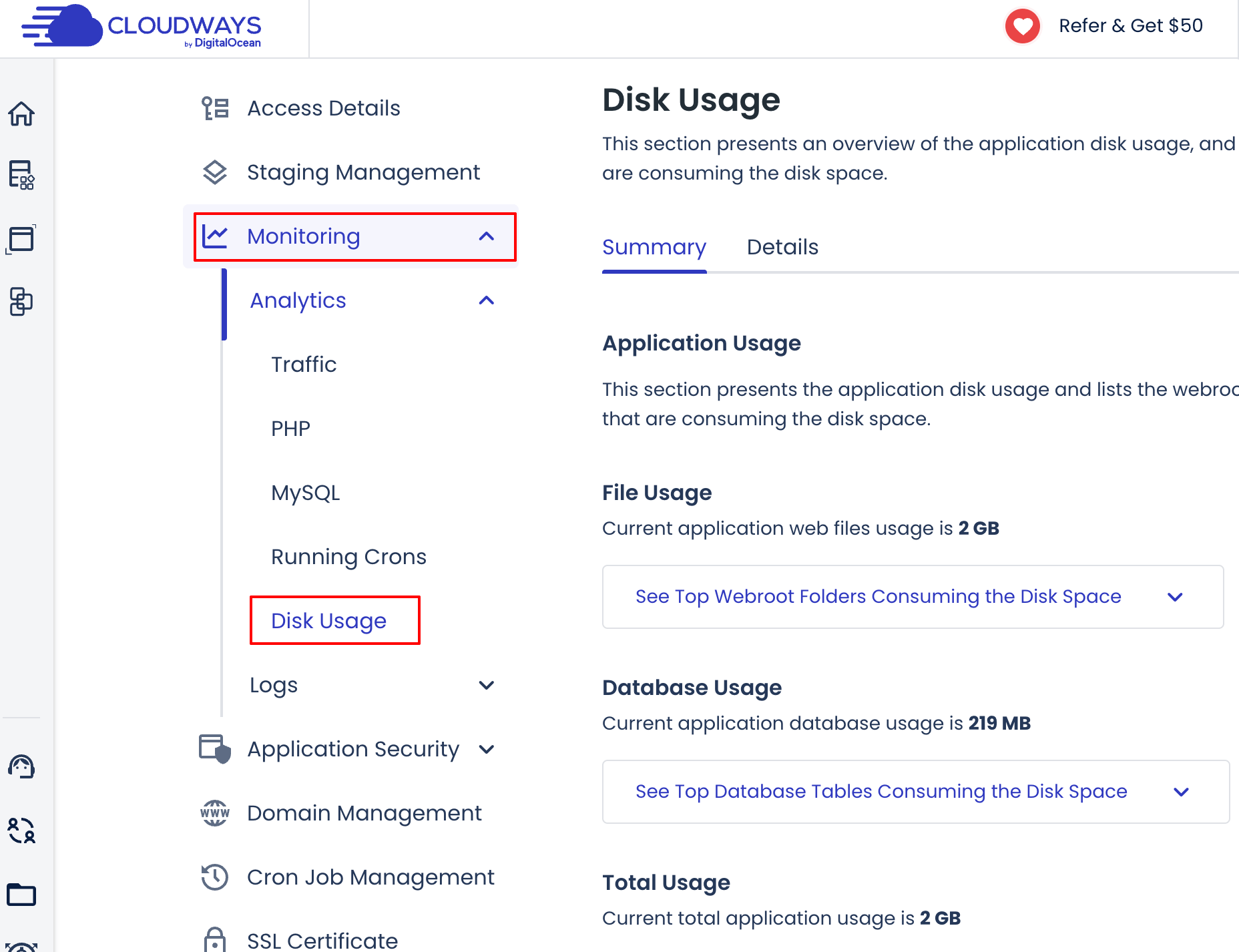
- Go to Account > Billing > Invoices.
- Click the latest invoice to expand all charges.
- Review:
- Server uptime in hours
- Backup storage usage
- Add-on charges
Bonus Tip: Use “Monitoring” in your server tab to track real-time bandwidth and resource usage. It will help you catch overuse before your invoice does.
How to Avoid Unwanted Charges In Cloudways Billing?
Here’s a quick monthly checklist to stay on top of your billing:
| Task | Frequency |
| Delete unused servers | Weekly |
| Remove test/staging environments | After use |
| Check add-on subscriptions | Monthly |
| Purge unused backups | Monthly |
| Review invoices before the due date | Monthly |
What to Do If You Were Overcharged?
It happens and yes, you can dispute it.
Here are the steps to request a refund:
- Go to Support > Submit a Ticket > Billing.
- Clearly explain the charge, include invoice numbers, and state the issue.
- Include evidence (screenshot, timestamps, logs if needed).
- Request a refund or credit.
Email Template:
Hello Cloudways Support,
I was charged for a server that I deleted on [date]. The charge for [server name] on Invoice #[number] appears to cover a period after it was no longer active.
Could you please review this and advise on a refund or account credit?
Thank you,
[Your Name]
Add-On Pricing (Optional but Useful)
Cloudways offers premium add-ons that are billed separately!
| Add-On | Approx. Cost |
| Cloudflare Enterprise CDN | Starts at $4.99/month |
| SafeUpdates (WP updates) | $3–$10/month |
| DNS Made Easy | $2.50/month |
| Malware Protection | $4/month |
| Rackspace Email | $1/month |
| Application Migration | $25/migration |
You can also get an extended premium support from the Cloudways team for $100/month. Make sure to review which add-ons you’ve activated in the console to avoid surprise charges.
Cloudways Client Billing: For Agencies & Freelancers
Cloudways offers a white-label Client Billing system that lets agencies charge clients directly with full control. So, if you run an agency or a freelancer, you can handle multiple tasks like creating and tracking real-time custom invoices, managing subscription billing, and automating payments through a centralized dashboard.
Key Features of Client Billing
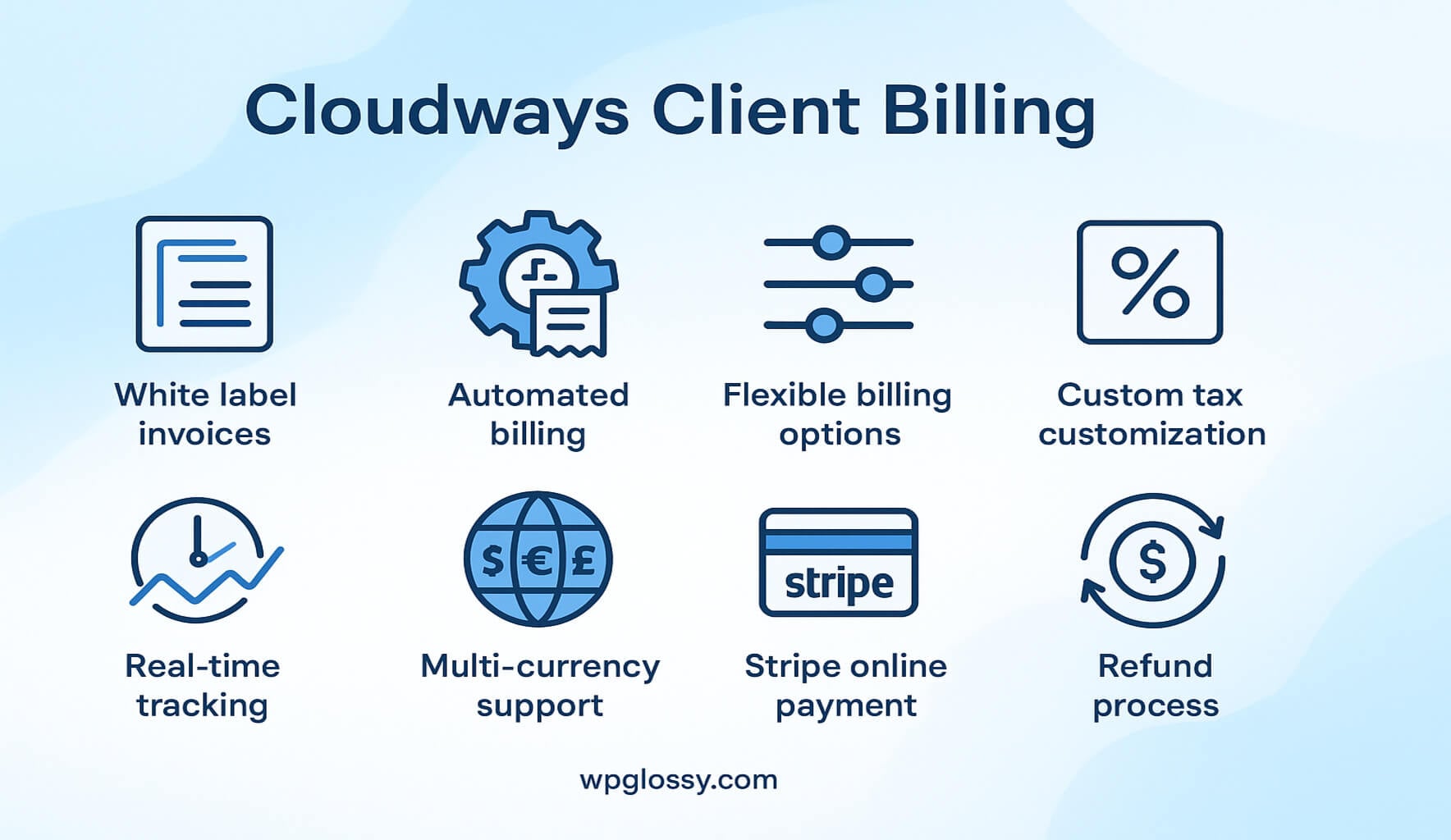
As you are controlling everything under a hub, your efficiency will be improved and time will be saved through automated tasks.
Client Billing Pricing Plans
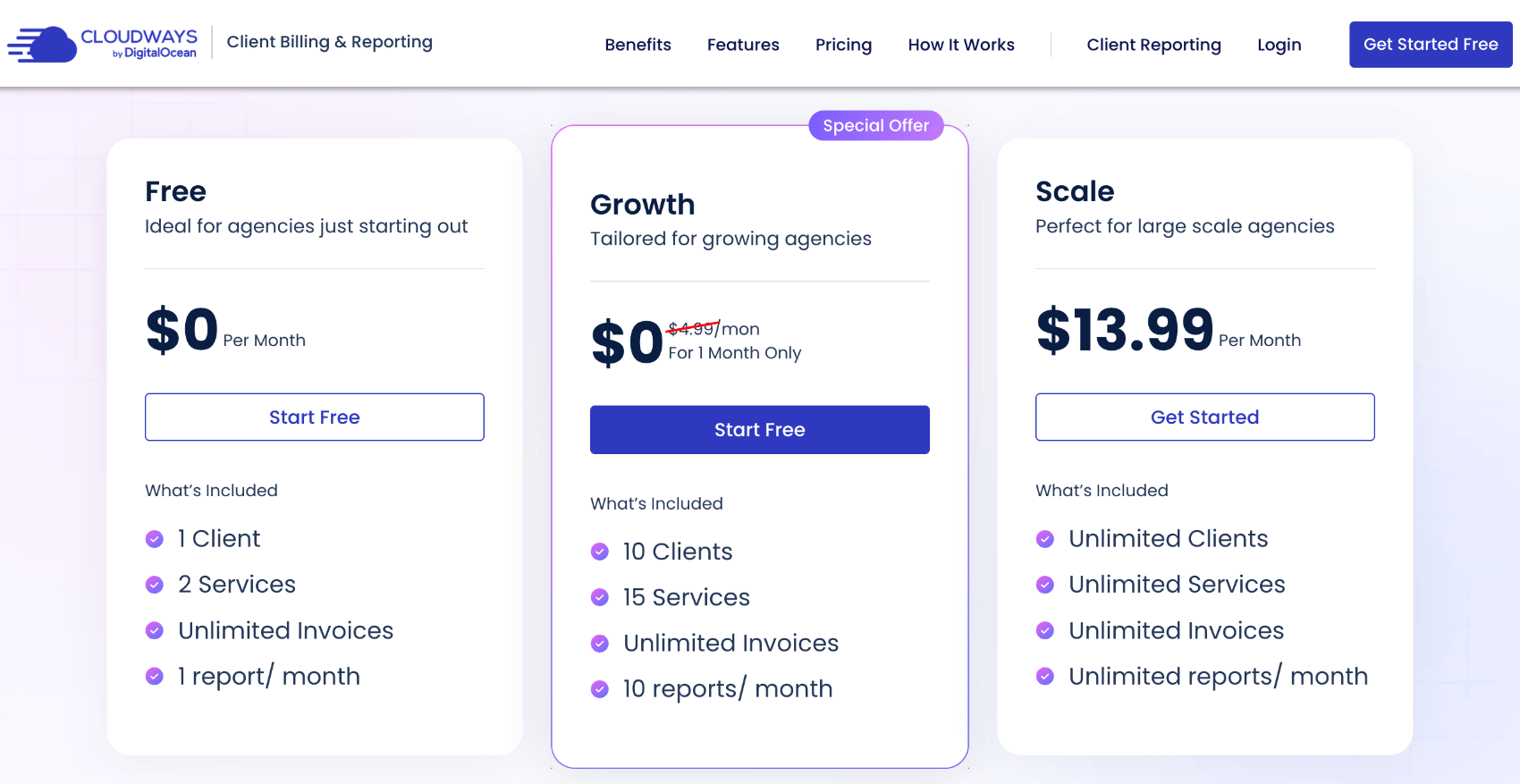
These plans are integrated with client reporting for full transparency on server performance, security, and updates.
How does Cloudways bill users for Autonomous plan?
If you use the Cloudways Autonomous Plan, you will be on the hourly pricing model. When you choose the basic plan ($35) and use the server for just 2 hours, you will only be billed for those 2 hours.
When you exceed the resource allocation, your site will continue to work, and you have to pay extra charges for the overusage.
For example, if you use the plan for 120 hours (5 Full days), your billing will be calculated like this!
For $35 plan & 1 Hour Usage – the cost will be $0.0486
For 120 hours – the cost will be 120 * 0.0486 = $5.83
So, you need to pay only $5.83 for the current month and the full price – $35.
How to Stop Cloudways Billing?
When you want to move your site to another hosting and stop billing, you must:
- Delete all servers
- Deactivate the active add-ons
- Remove active projects and download your backups
- Contact support for any discrepancy
Best Practices to Manage Cloudways Billing
Unlike traditional hosting providers with complex pricing and hidden fees, Cloudways keeps things simple and transparent. Its pay-as-you-go billing model will align with your needs for sure. Just practice the following to avoid Cloudways billing issues.
- Review invoices monthly
- Use account pre-funding for expense control
- Audit servers and add-ons regularly
- Delete unused servers before the 28th to avoid a full-month charge
- Use Client Billing for better client management
- Back up before deletion to avoid data loss
Frequently Asked Questions
What payment methods are available on Cloudways?
Cloudways accepts payments via credit or debit card and PayPal. You can also add funds through any of these payment modes to pay your monthly/hourly bills.
Do I get charged if I stop a server?
Yes. Cloudways continues billing unless the server is deleted, not just stopped.
Can I get a refund from Cloudways?
Refunds are not guaranteed, but if you successfully dispute charges by submitting support tickets, you will receive a refund.
Wrapping Up
Cloudways is a powerful hosting platform for developers, agencies, and growing businesses. By understanding how billing works, auditing your usage, and following best practices, you can avoid unexpected costs and keep your hosting bill under control.
I have seen some users end up surprised when they receive unexpected invoices, get overcharged, or continue paying for servers they thought were shut down. It’s great that you’re curious about how Cloudways charges its clients, because understanding the billing system can actually help you make smarter decisions for your business.
In this guide, I have broken down exactly how Cloudways billing works, invoice cycles, payment methods, client billing for agencies, common mistakes, and how to avoid unexpected charges. I hope you understand their usage-based model and avoid unexpected costs.


This article provides invaluable insights into Cloudways’ billing system. The step-by-step guide on auditing invoices and the practical checklist for managing billing tasks are especially helpful. Understanding the nuances of server deletions and add-on subscriptions can prevent unexpected charges. The emphasis on proactive monitoring and regular reviews is a great approach to maintain control over hosting expenses. Highly recommend this resource to anyone using Cloudways or considering it.