

Since I started using WordPress in 2010, I’ve always been curious about testing different performance plugins and seeing what actually works.
In this blog post, I have decided to do a comparison of WP Rocket Vs FlyingPress to find which one truly makes a difference in real-world performance.
For years, WP Rocket was my default recommendation. It was safe, predictable, and worked across almost every site I handled.
But recently, after testing FlyingPress on real blogs (not demo installs), I noticed something interesting:
Both plugins do the same things on paper, but the way they execute them is completely different! And that difference is exactly what impacts the Core Web Vitals, search engine rankings and real user experience.
So, instead of giving you a “feature comparison,” let me take this battle on a different path. If you’re searching for:
- FlyingPress vs WP Rocket real comparison
- Which caching plugin improves Core Web Vitals
- Best WordPress performance plugin for bloggers
This article will give you a clear answer. Let’s get started!
Disclosure: We get a commission when you buy a product via our affiliate link at no additional cost.
Table Of Contents
- Reality: They Are 85% Similar (But That 15% Matters)
- FlyingPress Vs WP Rocket – Quick Comparison
- FlyingPress Or WP Rocket? Which Is The Best WordPress Performance Plugin?
- 1. CSS Optimization: Game Changer
- 2. JavaScript Handling: Where Most Sites Break
- 3. Image Optimization: Hidden Cost vs Built-in Advantage
- 4. Ease of Use: WP Rocket Wins
- 5. Real-World Performance: Lab vs User Experience
- 6. Stability & Compatibility: WP Rocket’s Biggest Strength
- 7. FlyingPress Vs WP Rocket — CDN Comparison
- Plugin Price Comparison (FlyingPress vs WP Rocket)
- How I Tested FlyingPress And WP Rocket?
- Testing Blog Homepage
- After Using WP Rocket
- After Using FlyingPress
- What Real Users Are Saying?
- Which Plugin Should You Choose?
Reality: They Are 85% Similar (But That 15% Matters)
Before getting into the topic, you should understand that both FlyingPress and WP Rocket:
- Cache pages
- Minify CSS & JS
- Lazy load images
- Preload cache
- Integrate with CDN
In fact, most features overlap almost completely. And if you only compare checkboxes, you’ll conclude: “Both are the same. Just pick one.”
But that’s exactly where most bloggers go wrong! Because performance in 2026 is no longer about features. It’s about how intelligently those features are implemented.
FlyingPress Vs WP Rocket – Quick Comparison
| Aspect | FlyingPress | WP Rocket |
| Core Focus | Real-user performance | Ease of use & stability |
| Setup Experience | Requires configuration | Works instantly |
| CSS Optimization | Per URL (cloud-based) | Per page type |
| JavaScript Handling | Smart delay (automated) | Delay with manual exclusions |
| Image Optimization | Built-in | Separate plugin needed |
| Database Cleanup CDN | Yes FlyingCDN (Delivers entire page from the edge) | Yes RocketCDN (Serves only static files) |
| Compatibility | Good | Excellent |
| Best For | SEO-focused bloggers | Beginners/agencies |
FlyingPress Or WP Rocket? Which Is The Best WordPress Performance Plugin?
Now, let’s compare the important plugin aspects. You should understand that these are my personal experiences and they may conflict with others’ viewpoints.

1. CSS Optimization: Game Changer
When I started testing WP Rocket and FlyingPress on real sites, I noticed a remarkable difference in CSS optimization. Let me explain!
When I enabled “Remove Unused CSS” in WP Rocket, my blog’s performance scores improved, but the results weren’t always consistent. On my complex site, I still ran into issues with render-blocking CSS and occasional layout shifts.
When I switched to FlyingPress, I immediately understood the following thing!
FlyingPress approaches CSS optimization in a granular and intelligent way. Instead of applying a generalized optimization, it generates critical CSS on a per-URL basis, not just per page type.
I realized:
- Each individual page gets its own fully tailored CSS
- Only the styles actually used on that specific page are loaded
- Above-the-fold content renders significantly faster
- There’s less chance of unused or conflicting styles affecting layout
In contrast, WP Rocket:
- Applies optimization at a broader, template/page-type level
- Relies more on inline CSS, which can sometimes increase overall HTML size
- May load extra styles that aren’t needed for a specific page
Why does this matter in real-world performance?
This difference isn’t just technical! It directly affects how your site feels to users and how it performs in Core Web Vitals.
- LCP: Faster rendering of critical elements due to smaller, page-specific CSS
- CLS: More stable layouts because only necessary styles are applied
- TTFB & render time: Reduced CSS payload improves overall rendering efficiency
In simple terms:
- WP Rocket = “Good, generalized optimization that works for most sites.”
- FlyingPress = “Precision-engineered optimization tailored to each page.”
If you run a dynamic site like eCommerce, content-heavy blogs or use page builders, this level of precision can make a noticeable difference, not just in scores, but in real user experience.
2. JavaScript Handling: Where Most Sites Break
If you’ve ever optimized a WordPress site, you already know that the JavaScript is where things either improve or completely fall apart.
You can achieve amazing performance gains, but a single wrong setting can break menus, forms, sliders, or even core functionality.
With WP Rocket, you will get solid control over JavaScript optimization. Its features like “Delay JavaScript execution” and “Defer JavaScript” are powerful, but they come with a catch.
In real-world usage, you need to:
- Manually exclude critical scripts (like jQuery, analytics, or theme scripts)
- Test different pages and user interactions
- Fix broken elements like dropdowns, popups, or cart functionality
WP Rocket gives you flexibility, but you need to fine-tune things by yourself.
FlyingPress takes a noticeably different approach!
Instead of relying heavily on manual exclusions, it automatically delays JavaScript more intelligently by using patterns and built-in logic to find what should load immediately and what can wait.
I understood:
- Fewer things break when you enable optimization
- Less need for trial-and-error exclusions
- A smoother experience, especially for non-technical users
It also focuses on delaying scripts until user interaction (such as scroll, click, or tap), which significantly reduces initial load time without affecting functionality.
When I tested both plugins side by side:
WP Rocket
- Required manual tweaking for interactive elements
- Needed exclusions for things like menus, forms, or third-party scripts
- Took more time to stabilize
FlyingPress
- Worked much more smoothly out of the box (after initial setup)
- Handled most scripts correctly without intervention
- Required minimal debugging
As you know, JavaScript is the biggest contributor to Total Blocking Time (TBT), Interaction to Next Paint (INP) and even overall page responsiveness.
I noticed that FlyingPress can handle JS well. It not only improves scores but also ensures my site remains usable and fast.
How do these performance plugins optimize the images? This is an important comparison because it has a real impact on both performance and cost.
In WP Rocket, image optimization isn’t included natively. To fully optimize images, you need to use a separate plugin like Imagify.
It has a few practical drawbacks:
- Additional cost (Imagify is a paid service beyond free limits)
- Another plugin to install, configure, and maintain
- Dependency on an external service/API for image processing
- Potential compatibility issues across plugins
So, in WP Rocket, image optimization is a separate workflow.
On the other hand, FlyingPress takes a more integrated approach by including image optimization within the plugin itself.
It supports:
- Modern formats like WebP and AVIF
- Automatic compression and conversion
- Background processing without manual intervention
Once enabled, it works quietly in the background to optimize the images as you upload them or even retroactively across your media library.
Why This Matters in Real Use?
Images are the heaviest part of a webpage and if they are poorly optimized, then it will:
- Slow down Largest Contentful Paint (LCP)
- Increase bandwidth usage
- Hurt mobile performance
With built-in image optimization, FlyingPress simplifies the entire process! This built-in advantage makes FlyingPress more convenient, streamlined, and cost-effective for content-heavy sites.
4. Ease of Use: WP Rocket Wins
I would like to share my honest opinion in this ease-of-use comparison of WP Rocket and FlyingPress.
When you install WP Rocket, the experience feels almost effortless. It automatically enables a carefully chosen set of performance optimizations that are safe for most websites.
You don’t have to dig into the settings or worry about breaking something. In fact, within a few clicks, your site will be ready for caching, file optimization, and lazy loading.
WP Rocket is opinionated in a good way! It applies around 70–80% of performance best practices automatically, without requiring your technical knowledge.
If you are a beginner blogger or a business startup who are looking to make your site load fast without the learning curve, this is a huge advantage.
FlyingPress, on the other hand, takes a more hands-on approach. It is not difficult to use, but it assumes that you’re willing to spend a bit of time to understand how performance optimization works.
It offers several settings, and you need to enable and fine-tune them yourself. This includes script delays, CSS optimization, and bloat removal.
This flexibility is great for advanced users, but it also means:
- You need to know what each setting does
- You should spend time to test the configurations
- There’s a chance of misconfiguration if you’re not careful
So while FlyingPress gives you more control, it also expects more involvement.
The difference is clear!
- WP Rocket = “install and forget”
- FlyingPress = “configure and optimize”
5. Real-World Performance: Lab vs User Experience
This is where my perspective shifted after testing FlyingPress more thoroughly.
WP Rocket does an excellent job when it comes to improving lab-based performance metrics. You’ll see the improved speed scores and boost in overall load time right away after setup. It is impressive, but for me it is not enough.
FlyingPress takes a different approach by focusing more on real-world user experience, not just test scores. Instead of optimizing purely for lab tools, it prioritizes what actual visitors experience on your site.
This includes improvements in:
- CCrUX data – based on real user data collected by Chrome
- LCP – how quickly your main content loads
- CLS – how stable your layout feels while loading
- INP/FID – how quickly your site reacts to user input
What stands out is that FlyingPress is built with Google’s evolving ranking signals in mind. Since Google now places more emphasis on real-user metrics, optimizing for these signals can have a more meaningful impact than just chasing high lab scores.
I have also seen how FlyingPres handles things like:
- Script delay and prioritization – No block rendering through unessential JS.
- Above-the-fold optimization – visible content loads faster
- Smarter lazy loading – Boosts speed without hurting UX
Your site may not always score dramatically higher on every lab test than WP Rocket, but it feels faster and smoother to real users, especially on slower networks or mobile devices.
In short:
- WP Rocket = Optimizes for measurable speed (lab scores)
- FlyingPress = Optimizes for perceived speed (real user experience)
6. Stability & Compatibility: WP Rocket’s Biggest Strength
After I started using FlyingPress and came to appreciate what it can do, I still use WP Rocket on certain projects.
WP Rocket has built a reputation over the years for being extremely stable and universally compatible. It’s designed to work smoothly with a wide range of themes, plugins, hosting environments, and page builders.
If you have a WooCommerce, Elementor, or a custom setup, WP Rocket tends to “just work” with minimal adjustment.
Instead of pushing aggressive performance tweaks, this WordPress performance plugin focuses on safe, widely supported optimizations. So, you will get:
- Fewer chances of layout breakage
- Minimal conflicts with other plugins
- Less need for troubleshooting or debugging
- Reliable performance across different devices and browsers
This level of stability is why it’s been trusted by millions of websites.
FlyingPress, on the other hand, takes a more aggressive and cutting-edge approach to optimization. While enabling impressive real-world performance gains, it can occasionally introduce complexity.
Because of its advanced techniques:
- You may need to exclude certain scripts or styles
- Some features might require fine-tuning per site
- There is a chance of minor UI or functionality issues if not configured properly
These are not flaws! It is simply the trade-off that comes with pushing performance boundaries further.
You should understand:
- WP Rocket = “set it and trust it” stability
- FlyingPress = “optimize deeper with a bit more involvement.”
So if your priority is reliability and zero headaches, WP Rocket is the safest choice. But if you can invest time to get better performance, FlyingPress opens the door to advanced optimization.
7. FlyingPress Vs WP Rocket — CDN Comparison
Both plugins offer CDN integrations, but they differ significantly!
FlyingPress focuses on full-site delivery via edge caching, while WP Rocket keeps things simple with static asset distribution only.
| Feature | FlyingPress (FlyingCDN) | WP Rocket (RocketCDN) |
| CDN Provider | Cloudflare Enterprise | BunnyCDN |
| Coverage & Network Quality | Tier-1 global network (high reliability & routing efficiency) | Standard global CDN with decent coverage |
| Edge Page Caching (HTML) | ✅ Yes — full pages served from edge, reducing origin requests | ❌ No — pages still generated by origin server |
| Static Asset Delivery | ✅ Yes — CSS, JS, images via CDN | ✅ Yes — optimized asset delivery |
| Image Optimization via CDN | ✅ Built-in (compression, WebP, resizing) | ❌ Not supported |
| Server Load Reduction | High — most traffic handled at CDN level | Moderate — server still processes HTML |
| Setup Complexity | Simple, tightly integrated | Very simple, plug-and-play add-on |
| Pricing (CDN only) | ~$10/month (100GB, usage-based after) | ~$8–$9/month (flat pricing, fair usage) |
| Overall Value | Premium performance-focused CDN layer | Basic, affordable CDN add-on |
FlyingPress offers a more advanced, performance-driven CDN (with edge caching), whereas WP Rocket provides a simpler, cost-effective CDN mainly for static files.
Plugin Price Comparison (FlyingPress vs WP Rocket)
When it comes to plugin pricing(excluding CDN), both tools follow a similar annual licensing model, however, the value structure differs.
FlyingPress starts at about $59/year for a single site, and scales to $99/year (3 sites), $199/year (25 sites), and $249/year (unlimited sites).
All features are included in every plan, and importantly, it offers a 14-day free trial, which is rare among premium WordPress plugins.
As you scale to multiple sites, FlyingPress becomes noticeably more cost-efficient due to its cheaper multi-site tiers and unlimited plan.
WP Rocket, on the other hand, also starts at $59/year for one site, but increases to $119/year (3 sites) and around $299/year for higher or unlimited tiers.
It includes all core features across all plans, but does not offer a free trial. Instead, it offers a refund option.
Key pricing differences
- For single-site users → both are priced almost the same
- For multiple sites → FlyingPress is more affordable and scalable
- For risk-free testing → FlyingPress wins (free trial vs no trial)
- For total cost → WP Rocket can get higher if you add extras (for image optimization)
Same starting price, but FlyingPress scales cheaper and offers better overall value, especially for multi-site users.
How I Tested FlyingPress And WP Rocket?
To keep things fair and practical, I tested both plugins in similar environments:
Test Setup
- WordPress blog (content-heavy + 20 plugins)
- Hosting: LiteSpeed-based VPS
- Theme: Lightweight (GeneratePress)
- No CDN initially (to isolate plugin impact)
Metrics Measured
- PageSpeed Insights (Mobile)
- GTmetrix (Fully Loaded Time)
- Core Web Vitals: LCP, CLS, and INP
Testing Blog Homepage
This is where most caching plugins struggle because it contains multiple images, Ads/scripts and Dynamic elements.
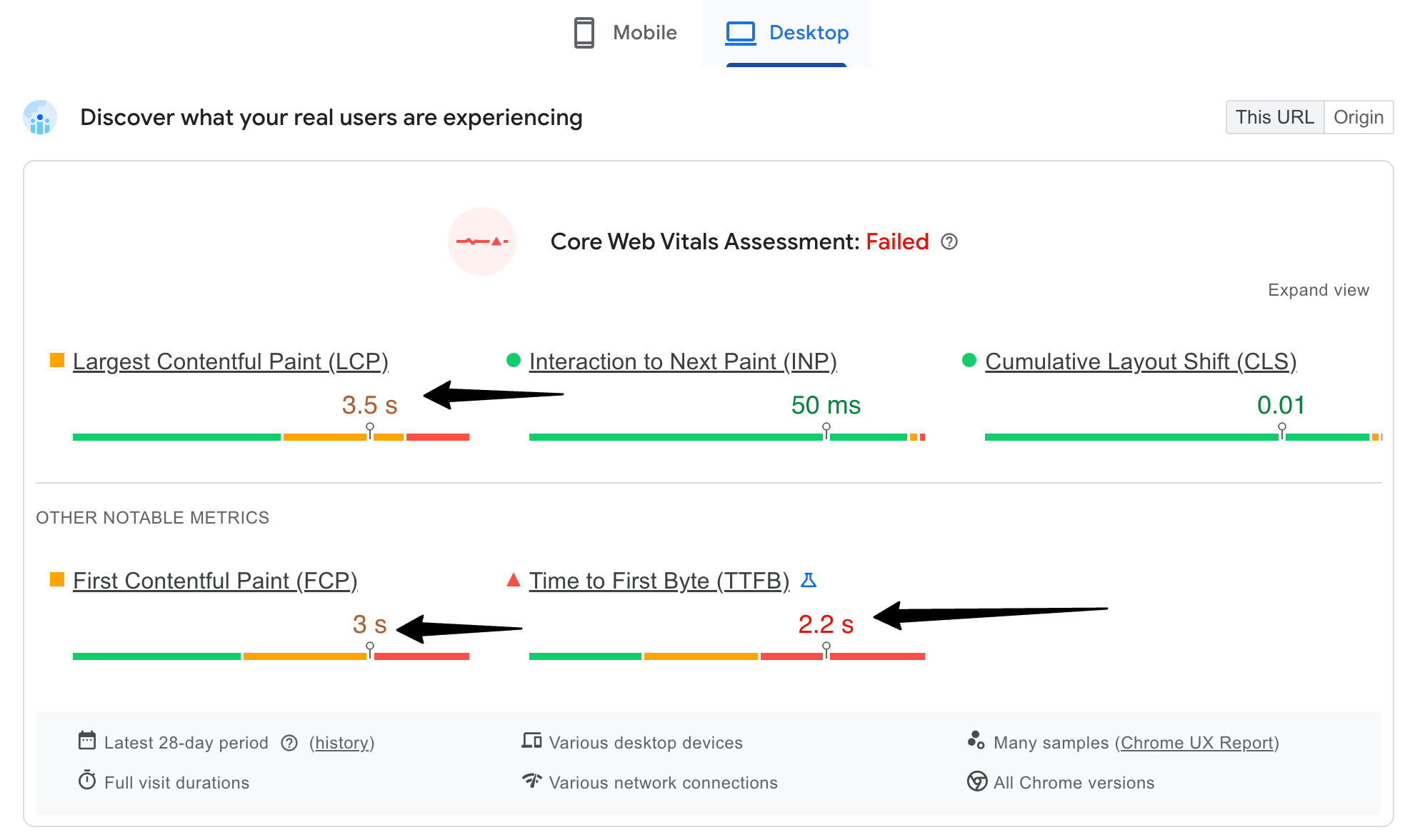
Before Optimization (No Plugin)
- LCP: 3.5 S
- FCP: 3 S
- TTFB: 2.2 S
Speed Result – Core Web Vitals Failed; Slow blog performance.
After Using WP Rocket

- LCP: 2.1 s
- FCP: 2.1 s
- TTFB:1.5 s
What I Observed?
WP Rocket improved performance:
- Page loads faster
- Load time reduced
- Setup took less than 10 minutes
However:
- Some unused CSS remained
- Slight layout shifts are still visible
- Interaction delay is still noticeable
- JS-heavy elements needed manual tuning
Speed Result – WP Rocket offered a great baseline improvement. Core Web Vitals passed.
After Using FlyingPress
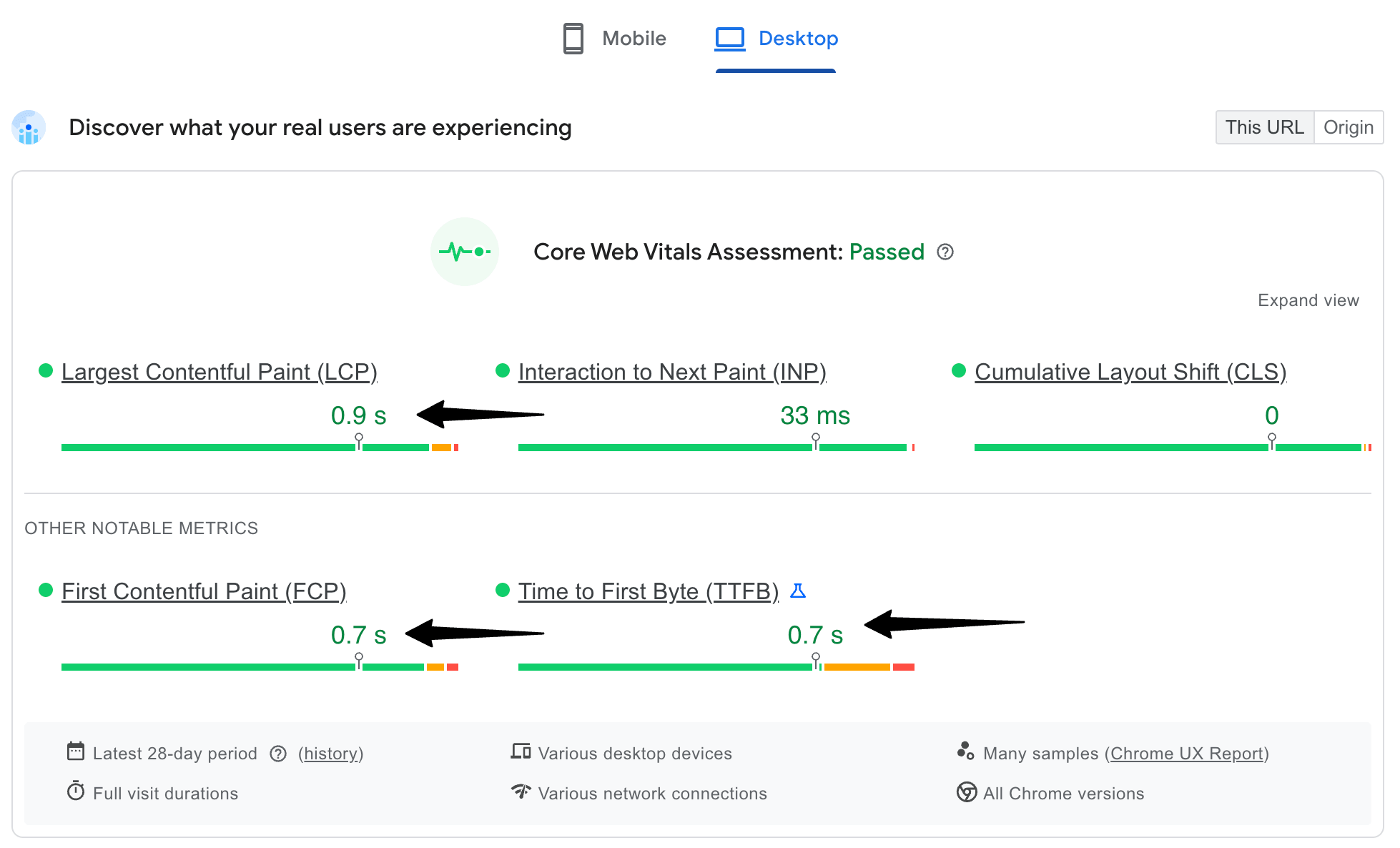
- LCP: 1.9s
- CLS: 0.04
- Fully Loaded Time: 2.1s
What has changed?
This is where things got interesting.
With FlyingPress:
- Above-the-fold content loaded noticeably faster
- Layout shifts were almost eliminated
- Page felt more stable while loading
- Less manual tweaking required
Speed Result – Not just a faster, FlyingPress offers a cleaner and smoother experience
What These Results Actually Mean?
If you just look at numbers, both plugins perform well. But here’s the real takeaway from my testing:
- WP Rocket improves speed
- FlyingPress improves experience
And Google increasingly ranks based on experience, not just speed!
What Real Users Are Saying?
Check the recent discussions on Reddit by the real users!

Which Plugin Should You Choose?
After using both, here’s how I personally decide.

Final Thoughts (My Honest Opinion)
If this were 2020, I would have said: “Just use WP Rocket. Don’t overthink.” But in 2026, things are different. Now:
- WP Rocket gives you solid performance with zero effort
- FlyingPress gives you superior performance if you care about optimization deeply
And if your goal is to rank higher, improve Core Web Vitals, and build a faster blog, your choice should be FlyingPress.
My Personal Recommendation!
If you’re just starting → go with WP Rocket
If you’re serious about SEO → move to FlyingPress
Because today, Speed is no longer a feature; it’s a ranking factor, a UX factor, and also a revenue factor.