

Looking for the latest Cloudways promo or a verified Cloudways coupon code to save on managed cloud hosting? You’re in the right place.
On this page, you’ll find the best Cloudways discounts available right now, including up to 30% OFF for the first 3 months, along with step-by-step instructions on how to apply the coupon successfully.
Without delay, I’d like to share the 100% working code. Grab this hosting deal now!
Use The Official Code: WPGLOSSY
Get 30% OFF for 3 Months
I regularly update this page to ensure every Cloudways discount listed here is tested, working, and valid for new users.
Whether you’re launching a WordPress site, moving from shared hosting, or scaling an existing project, using a verified Cloudways coupon can significantly reduce your hosting costs without sacrificing performance.
Note – Unlike many coupon pages, I don’t list expired or fake codes. Every promo code on this page is verified and updated, so you always get the maximum available discount when signing up. This special offer is created by the team, as I’ve been using their hosting service for the past eight years.
Disclosure: We get a commission when you buy a product via our affiliate link at no additional cost.
Table Of Contents
Exclusive Cloudways Promo Code – WPGLOSSY

- Works worldwide
- Works for all Cloudways cloud providers
- Applicable for new customers
- Tested and verified regularly
- No hidden conditions
Active Cloudways Promo Codes & Discounts (Updated)
| Live Cloudways Hosting Deals | 2 |
30% OFF
Offer: 30% Off on any Cloudways hosting plan.
Who: New Customers Only!
30% OFF
Offer: A flat 30% discount on first 3 Months Cloudways invoice.
Applies To: Every single Cloudways plan available.
How To Redeem The Cloudways Coupon Code?
Follow the simple steps to claim your highest hosting discount!
Step 1. Visit Cloudways Site
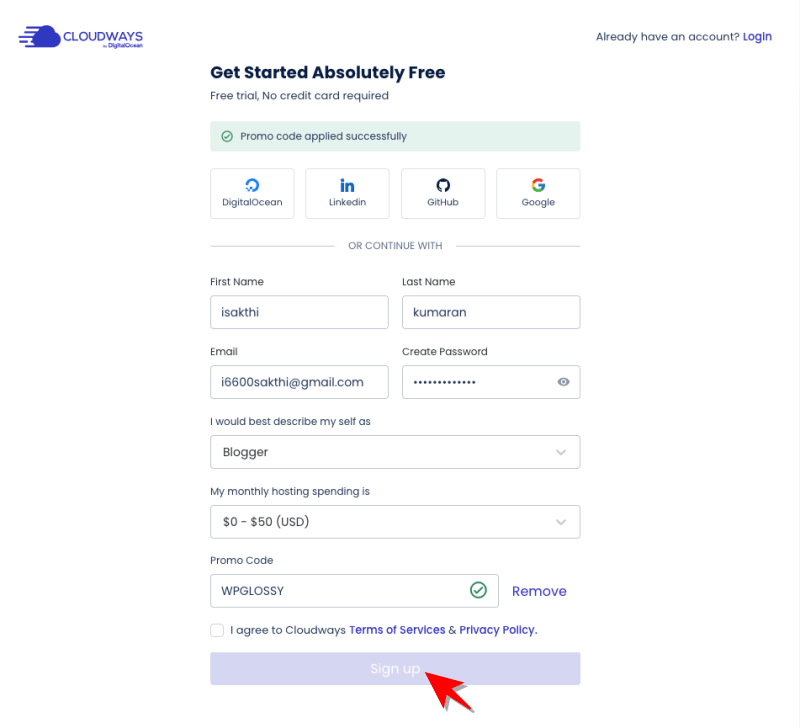
This official website takes you to the signup page. When you click this link, the 30% Cloudways discount will be automatically applied to the form (see the image below).
Fill in your details such as name, email, profession, and average income.
See the green tick mark after my verified Cloudways code.
Step 2. Start Free Trial
Push the button “Sign Up.” It will take you to the server page.
Read the top message; click “VERIFY YOUR ACCOUNT.”

Step 3. Activate Your Account
You will get an activation email in your inbox. Verify your hosting account by clicking the “Login & Activate” button.

Step 4. Complete Phone Verification
After the email verification, you must complete the verification from your Phone. Look at the reference image below!
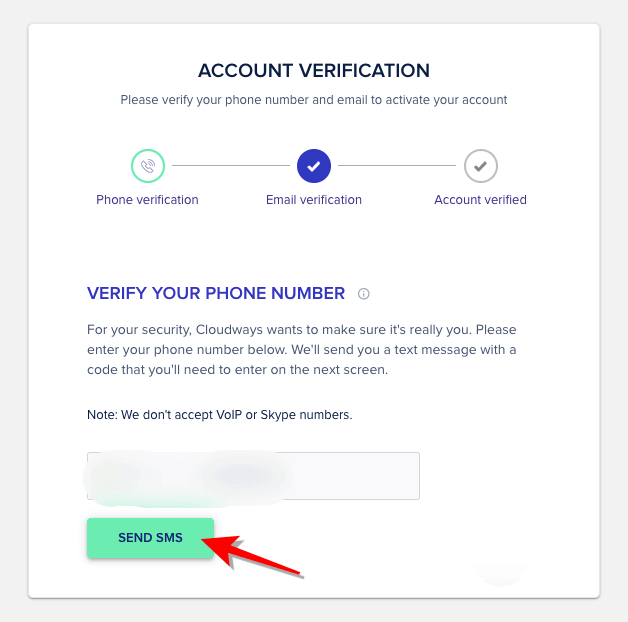
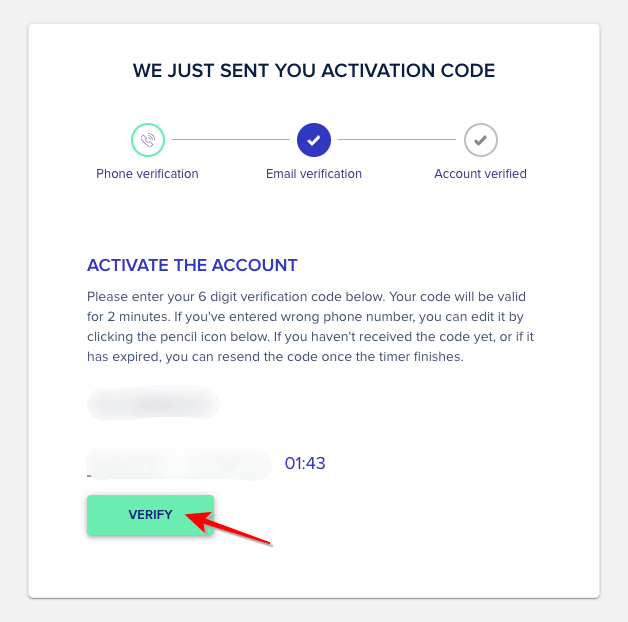
You will now receive the activation code via SMS. Enter it and finish the verification process.
Step 5. Configure Your Cloud Server
You have successfully utilized my 30% Cloudways sale code. Now, proceed to the server launch and setup. Here, you must choose your website’s backend content management system and name your application, server, and project.
Refer to the image below!

Step 6. Select Your Server Size & Location
After filling out the application and server details, select a suitable cloud server from the five choices based on your site requirements.
Select a server size based on your website’s traffic volume. By default, Cloudways will suggest the 2 GB premium plan of DigitalOcean; however, you can select the server size that best fits your needs.
Also, pick the server location based on your target audience. The default data center location is New York; however, please select a suitable location from the list. At the bottom of the page, see the price of the plan you have chosen.
Step 7. Launch The Server
So, all done. Click “Launch Server” (Look at the green button in the above image). Now, Cloudways will deploy your server in a few minutes.
Step 8. Get Your Free Credits
While setting up the server, you must add a payment method to send $1 for card confirmation. This $1 is refundable, and you will get it back immediately.
As you have used the WPGLOSSY code, the free credits will be automatically applied to your account. You can check this under the “Funds Summary” section.
Note – If you didn’t receive the free credits, please contact the support team; they will assist you in obtaining the Cloudways sale. Additionally, if you register with a free domain or a suspicious email address, you will receive a message stating that the team will respond within 1–2 business days.
Cloudways Free Trial
Cloudways has a free trial account for new users. If you are a dedicated blogger, small business owner, freelancer, or developer who wants to evaluate server performance before purchase, use the trial offer for 3 days without the need to add your credit card details.
After three days, upgrade to a suitable plan; otherwise, your server will be deleted after the free trial expires. Please note that premium Cloudways features, including advanced security, email services, and paid add-ons, will not be available during the trial period.
My Tips To Save More On Cloudways Hosting
Follow these tips to save on hosting costs!
1. Choose the Right Cloud Provider
Cloudways supports DigitalOcean, Vultr, Linode, AWS, and Google Cloud
For most users, the cheapest and best value are:
- DigitalOcean Standard
- Vultr High Frequency (best performance per dollar)
AWS and Google Cloud are much more expensive unless you have enterprise needs.
2. Start Small, Scale Up Later
Cloudways allows vertical scaling at any time.
So start with:
- 1GB or 2GB RAM plan
- Upgrade only when traffic grows
This alone saves a lot because many beginners overestimate server needs.
3. Turn Off Add-Ons You Don’t Need
Cloudways has add-ons like:
- Rackspace email
- SMTP service
- Cloudways CDN
- Application monitoring add-ons
Disable anything not required. You can always re-enable later.
4. Use Cloudflare Instead of Cloudways CDN
Cloudflare’s free plan gives:
- Global CDN
- DDoS protection
- Security firewall
This can replace paid CDN add-ons, significantly reducing costs while improving performance.
5. Use Server-Level Caching
Cloudways hosting has:
- Varnish
- Redis
- Memcached
- OPcache
When you configure caching properly, it reduces CPU & RAM usage, you can stay on cheaper servers.
6. Enable Auto-Backups
Backups cost extra depending on frequency.
To save money:
- Set backups to 6–12 hours, not every hour
- Delete outdated snapshots
This reduces unnecessary storage costs.
7. Manage Multiple Small Sites on One Server
Instead of buying multiple servers, use a single, slightly larger server to host multiple websites.
Cloudways makes it easy to isolate applications.
- Saves 30–70%, depending on how many sites you have.
- Switch to Annual Billing for Add-ons (Where Available)
- Some add-ons offer annual pricing with discounts.
Not huge, but every small amount helps.
8. Monitor Server Usage
Inside the Cloudways dashboard:
- Check RAM
- CPU usage
- Disk usage
If it’s consistently low, scale down the server and save monthly.
Why I Recommend Cloudways (Experience-Based Insight)
Even though you’re here for a Cloudways new account promo, it’s still important to know why Cloudways is one of the top-rated managed cloud hosting platforms.
Cloudways is built for performance-focused websites, agencies, and businesses that need the fastest, most scalable hosting without the technical headaches.
Over the years, I’ve helped countless bloggers, agencies, and business owners choose hosting, and Cloudways consistently delivers one of the best experiences for performance and scaling.
How does Cloudways always impress me?
- Fast loading time even with heavy themes/plugins
- Highly stable uptime during traffic spikes
- Zero server management headaches
- free migration by the technical experts
- Affordable cloud hosting that grows with your needs
- Ideal for WordPress, WooCommerce & PHP applications
Cloudways allows you to experience cloud-grade performance without being a tech expert. I use the Vultr High-Frequency plan for this blog and the DigitalOcean Standard plan for my secondary blog! Both offer ultimate performance to handle the traffic spikes at times.
Cloudways Pricing Before & After Applying Coupon
Here’s a practical look at how much you save on Cloudways pricing.
| Cloud Provider | Regular Price | Price After 30% OFF | Best For |
| DigitalOcean 1GB | $11/mo | $7.70/mo | New bloggers |
| Vultr HF 1GB | $15/mo | $10.50/mo | Fast WordPress hosting |
| Linode 1GB | $12/mo | $8.40/mo | Business sites |
| AWS Small | $36.51/mo | $25.55/mo | Enterprise apps |
| Google Cloud Small | $33.18/mo | $23.22/mo | High scalability |
Vultr High Frequency offers outstanding speed for WordPress, WooCommerce and LMS websites.
Updated Promo Codes 2026
I have consolidated the current deals for Cloudways 2026. Please check and use the suitable coupon to receive your cloud hosting savings!
| Cloudways Saving Offer | Verified Code | Status |
| 30% Discount for first 3 Months | WPGLOSSY | Live |
| 3-Day Free Trial | FREE TRIAL | Live |
| Black Friday Deal (50% OFF for 3 Months) | BFCMWP50 | Expired |
| 20% OFF on 1st Invoice | CLOUDWAYS20 | Live |
| 30% OFF for 3 Months | CW30FOR3 | Live |
| Summer Sale (30% OFF For 5 Months) | SUMMER305 | Expired |
| For UPCODE Users | UPCODE | Live |
| For Brizy Page Builder (20% OFF) | Brizy4Cloudways | Live |
| For Wincher Users (20% OFF for 3 months) | Cloudways | Live |
Note – Don’t enter the Expired code; I’ll keep updating the latest Cloudways coupons for 2026. Stay Tuned!
Cloudways Discount – FAQ
Does Cloudways give real Discount codes?
Yes. Cloudways provides promotional discounts through partner codes and special campaign links. These are time-limited and range from 10% to 40%, depending on ongoing offers.
Does the Cloudways Signup coupon work for all plans?
Yes, the official verified coupon applies to all plans as a new-user deal.
Is there Any Cloudways Savings & Deals Available for existing users?
Generally, Cloudways hosting coupons apply only to new accounts. However, existing users sometimes receive email-only offers during major sale seasons, such as Black Friday or New Year’s.
How do I know if my discount applied?
You can confirm the applied discount inside your Cloudways billing panel. The promo code or promotional percentage will be displayed on your first invoice or credit summary.
Wrapping Up
Using a verified Cloudways coupon code is one of the easiest ways to save money on high-performance cloud hosting. With the current promo code, you can enjoy premium features like managed security, free migrations, and top cloud providers, all at a discounted price.
Before signing up, make sure you apply the code correctly during checkout to activate your Cloudways discount. I recommend bookmarking this page, as we update it regularly with new offers, better deals, and the latest working Cloudways coupons.
Cloudways offers better performance than GoDaddy, Hostinger, and SiteGround. For a better understanding of pricing, read the comparisons: Cloudways Premium vs. Standard DO plan and Cloudways Vultr High Frequency vs. Standard plan to select the ideal server for your dream site.
Use Limited Time Hosting Deals Code: WPGLOSSY – Enjoy 30% OFF instantly



Thanks for sharing this! The Cloudways coupon code guide is really helpful for anyone looking to save on managed cloud hosting. I especially appreciate the breakdown of discounts and the clear instructions on how to apply the coupon during signup. It makes the whole process much easier for beginners and experienced users alike.