

Choosing between Cloudways vs Hosting.com (formerly A2 Hosting) isn’t just about specs! It’s about how your site performs when it actually matters
As I have been blogging for over a decade, I have had the opportunity to use both hosting services. And here are my quick insights!
Cloudways – powering my main blog with consistent traffic
Hosting.com – used for multiple niche sites and experiments
This comparison is based on real usage, not affiliate claims—covering performance under load, pricing over time, and ease of scaling.
Disclosure: We get a commission when you buy a product via our affiliate link at no additional cost.
Table Of Contents
- Cloudways Vs Hosting.com – Quick Comparison
- Why Choose Cloudways Hosting?
- Why Prefer A2 Hosting Instead Of Cloudways?
- Cloudways Vs A2 Hosting – Detailed Comparison
- Performance & Speed (What I Actually Observed)
- 2. Ease of Use (Learning Curve Reality)
- 3. Security & Reliability (Real Observations)
- 4. Scalability (Where I Felt the Biggest Difference)
- 5. Pricing (What Actually Happens Over Time)
Cloudways Vs Hosting.com – Quick Comparison
| Feature | Cloudways | Hosting.com |
| Hosting Type | Managed Cloud | Shared/VPS/Dedicated |
| Best For | Scaling websites | Beginners |
| Performance | ⭐⭐⭐⭐⭐ | ⭐⭐⭐⭐ |
| Pricing | Slightly expensive (but worth it) | cheap, but high on renewal |
| Ease of Use | Moderate | Easy |
| Scalability | Instant | Limited |
Why Choose Cloudways Hosting?
Self Migration – A free plugin is available to move your site from the current hosting to Cloudways.
Automated Backup – Easy to configure and restore the backup files. You have to pay a fee for off-site backup.
High security – Detailed firewall protection, Regular security patching, and auto-healing for high security.
Faster Performance – Optimized advanced cache, multiple databases, PHP 8 server, and Redis support.
Flexible Pricing – Pay-as-you-go monthly plans! No high renewal price.
Why Prefer A2 Hosting Instead Of Cloudways?
Unlimited bandwidth – Unlimited bandwidth, thanks to its turbo plan.
Dasboard – Simple cPanel with pre-configured setup.
Unlimited Email Addresses – unlimited email addresses with POP3, IMAP, and SMTP support
Dedicated Support – Good team readily avaialbe to resolve general issues.
Cloudways Vs A2 Hosting – Detailed Comparison
Let’s compare the other essential features so that you can choose the suitable server for your business site.
Performance & Speed (What I Actually Observed)
Cloudways Performance Experience
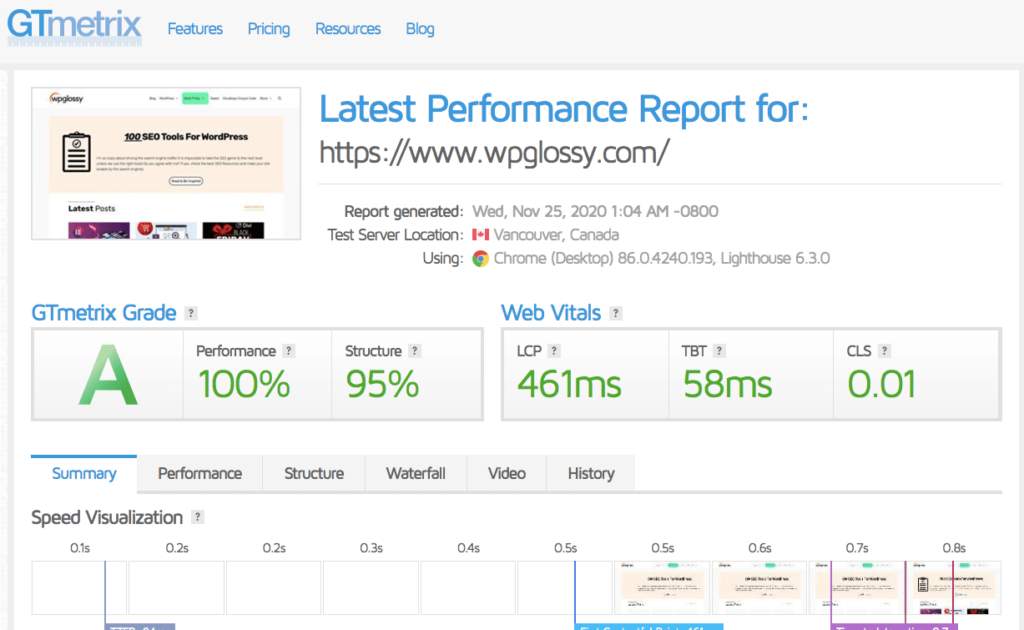
On Cloudways, my main blog:
- Loads consistently under 1 second
- Handles traffic spikes without crashing
- Maintains stable admin dashboard speed (even with many plugins)
One real scenario – During a traffic spike from a Google ranking jump, my site stayed stable. No downtime, no slowdown.
Hosting.com Performance Experience
On Hosting.com, my niche sites:
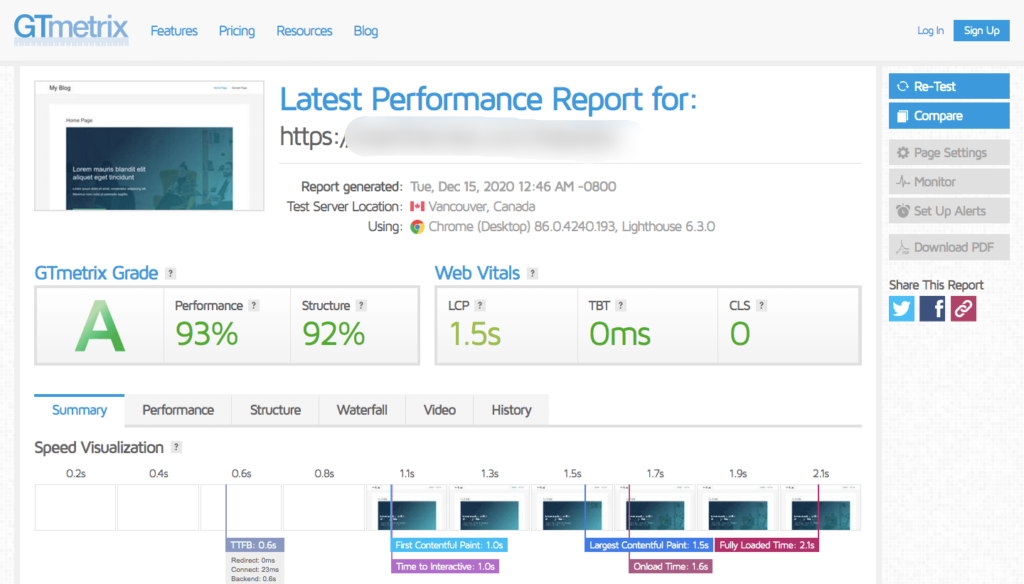
- Perform well initially
- Start slowing as content and plugins increase
- Occasionally lag in the WordPress dashboard
Some specific issues I faced: shared hosting caused inconsistent speeds during peak hours, and the WordPress admin interface sometimes felt sluggish.
Honest insight – Hosting.com is fine until you grow. Cloudways is built for when you do grow. Look at their speed scores.
Speed Test Score | Cloudways | Hosting.com |
GTMetrix | 100% | 93% |
Loading Time | 0.461ms | 1.5s |
2. Ease of Use (Learning Curve Reality)
Hosting.com Experience
This affordable hosting uses cPanel with full control over files, domains, emails, databases, and security settings under a single roof. It is very comfortable for beginners who want flexibility without needing technical expertise.
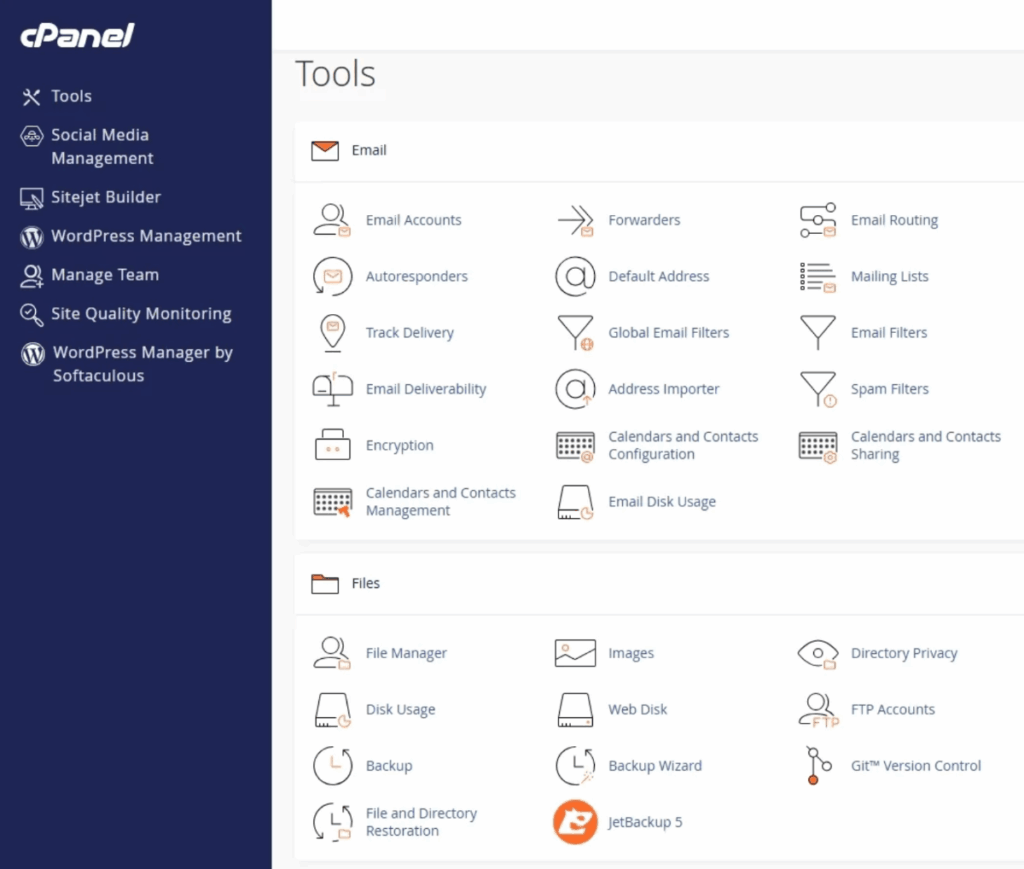
- Very easy to start
- Familiar cPanel
- Ideal for first-time users
Everything is available, but spread across multiple sections! If you look for the hosting with manual control dashboard, Hosting.com is the right choice.
Cloudways Experience
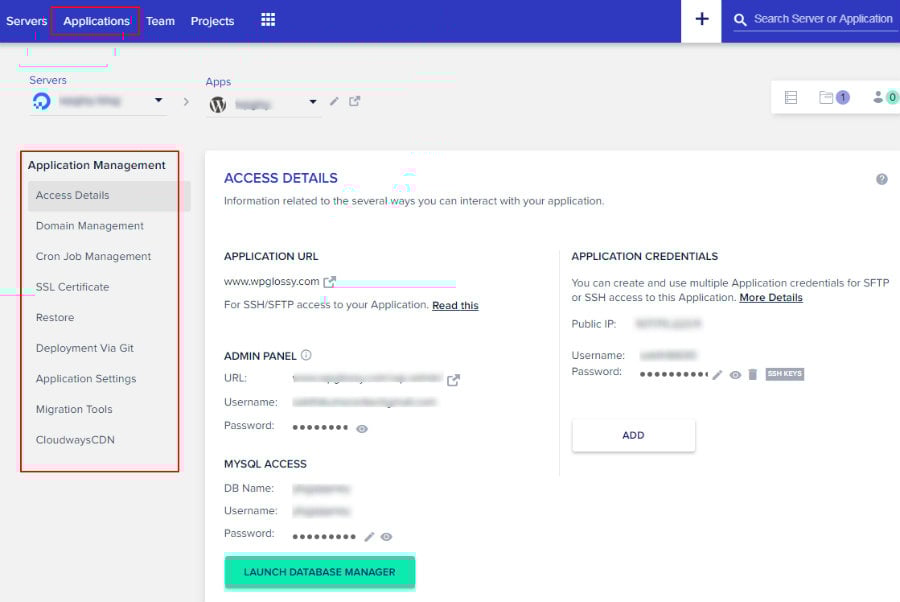
- Slight learning curve initially
- More options and flexibility
After a few days, it became intuitive
My takeaway: Cloudways feels complex at first, but more powerful long-term. This dashboard is nothing but automation and simplicity at scale.
3. Security & Reliability (Real Observations)
In Cloudways, I rarely had to worry about:
- Server-level issues
- Security patches
- Downtime
Backups were automated, and restoring was simple during testing.
In Hosting.com, Security was decent, but:
- More manual involvement was needed
- Some features depended on the plan tier
For beginners, it’s fine. For hands-off management, Cloudways feels safer.
4. Scalability (Where I Felt the Biggest Difference)
Cloudways Experience
Scaling on Cloudways was seamless. At one point, I upgraded server resources due to traffic growth:
- Took just a few clicks
- No migration needed
- No downtime
This is something traditional hosting rarely offers!
Hosting.com Experience
Scaling required:
- Upgrading plans manually
- Considering migration for better performance
It works, but it’s not effortless.
5. Pricing (What Actually Happens Over Time)
My Hosting.com Cost Experience

I initially chose Hosting.com for affordability. It worked well for testing niche ideas.
But over time:
- Renewal pricing increased significantly
- Add-ons became necessary (backups, performance tools)
- Total cost was higher than expected
It’s affordable upfront, but not always long-term.
My Cloudways Cost Experience
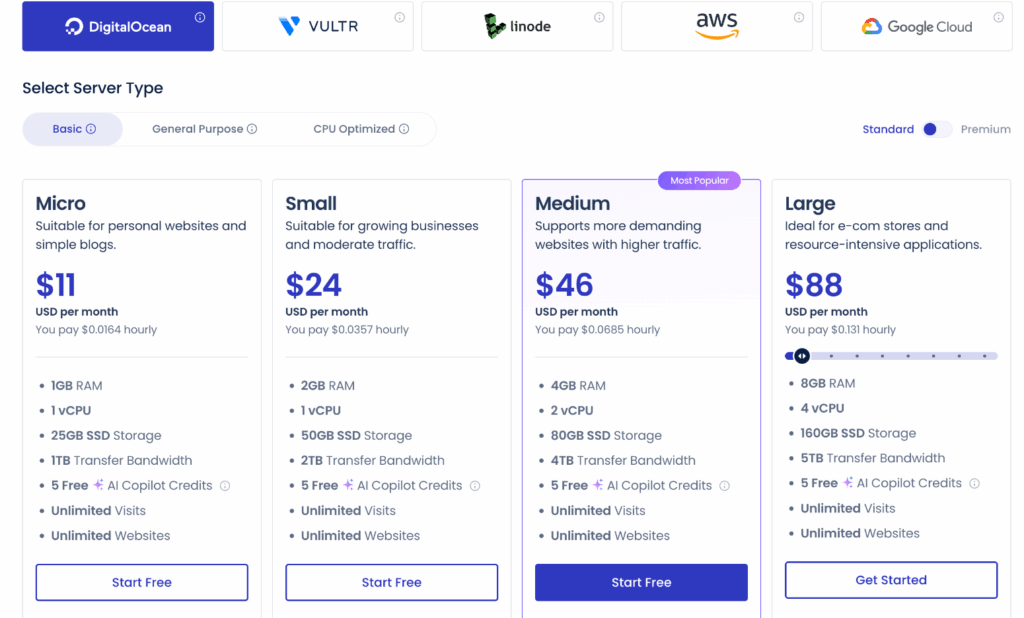
Cloudways felt expensive at first. But after using it:
- I only paid for what I needed
- No sudden price jumps
- Performance justified the cost
Especially for my main blog, better speed directly improved SEO rankings, User engagement and Revenue
Frequently Asked Questions
Is Cloudways worth it compared to Hosting.com?
Yes! especially if your website generates income or relies on SEO. From my own experience, after moving to Cloudways , I have seen the improvemats in Page Speed, Site Stablity and Overall User Experience. It directly impacted my rankings and engagement.
Which hosting is better for SEO: Cloudways or Hosting.com?
Cloudways has a clear advantage for SEO because of Faster loading speeds, Better uptime and consistent performance. I’ve personally seen better Core Web Vitals scores on Cloudways, which plays a major role in search rankings.
Can Hosting.com handle high traffic websites?
It can handle, but only up to a point. For small to medium traffic, Hosting.com works fine. However, during traffic spikes, I’ve experienced slowdowns on shared plans. For high-traffic sites, your choice should be Cloudways as it is more reliable.
Final Verdict: Cloudways vs Hosting.com (From Real Experience)
After I use both hosting services the difference becomes very clear over time!
Hosting.com is what I would recommend if you’re just starting out. It’s simple, affordable, and gets the job done for smaller projects or testing new ideas.
But Cloudways is what I trust for anything serious projects! When your website starts to grow and revenue becomes important, then the performance is no longer optional.
That’s where Cloudways consistently delivered better results for me, from faster load times to more stable uptime. Till now, I have received a great support from the technical team and also don’t have any issues in billing.
If I had to summarize it based on my own journey:
- I start projects on Hosting.com when I want something quick and low-cost
- I run important sites on Cloudways where performance actually matters




Hey Nirmala,
Because of its dedicated environment, all servers used in Cloudways handle traffic during spikes rather than lite speed web server usage in A2 hosting. With the help of auto-healing managed cloud servers and other speed qualities, Cloudways wins the speed performance battle with A2 Hosting.