

Table Of Contents
Cloudways Vs DigitalOcean – Who offers a better cloud hosting service to launch my online business? This is undoubtedly something that you would need to address!
Specifically, if you want to get a new hosting service, it makes no sense to pick the wrong option for yourself!
Being a full-time blogger, I get the perfect opportunity to handle several websites, and I have tried almost all the well-known web hosting services.
However, I don’t have a technical brain, and yes, I am always afraid of handling complex technical tasks on the server side. With the help of my working partner, I launched my niche blog on DigitalOcean.
This blog is hosted on Cloudways, and it’s pretty easy to manage things since it is a managed cloud hosting type!
Hence, I have decided to write a comparison, Cloudways Vs DigitalOcean, to clarify things, and it would help you gain a better perspective on buying a suitable server.
First, you should know,
- A couple of years back, DigitalOcean acquired Cloudways hosting.
- You can use DigitalOcean through Cloudways hosting; the price is the only difference.
- Cloudways is not operating the hosting servers. It is a managed hosting service that helps site owners get peace of mind by handling back-end tasks.
- Cloudways has an easy-to-use interface suitable for non-tech-savvy users and beginners.
- You must possess the technical skills to launch and use the DigitalOcean server.
Let’s begin the battle! If you don’t have time to read the in-depth details and want to pick the right one immediately, look at the table!
Cloudways Vs DigitalOcean – Quick Comparison
Features | Cloudways | DigitalOcean Regular CPU |
Pricing (basic plan) | $11/mo (DO Plan) | $4/mo |
RAM, Storage & Bandwidth | 1GB, 25GB & 5TB | 512MB, 10GB & 500GB |
Uptime Guarantee | 99.9% | 99.9% |
CDN | $4.99 from Cloudflare | $5 From Spaces |
Free Migration | Yes | Yes |
SSL Certificate | Free | Free |
Tech Support | 24 X 7 Live Chat & Ticket | |
Free Trial | Available | Unavailable |
Why Cloudways Instead Of DigitalOcean?
So, from the above comparison table, it’s crystal clear that you should go for Cloudways for the following reasons.
- Highly Secured – Cloudways offers managed security with dedicated firewalls and a free auto-renewal SSL certificate. This managed cloud hosting provides automatic backup as well.
- Superfast Performance – This affordable cloud hosting server contains SSD servers, Built-in advanced cache, CDN, and an optimized stack for 10X speed.
- Server Management – You don’t need to worry about the painful server management tasks as the support team handles DNS management, application management, site migration, and server monitoring.
- Subdomain Creation – Creating Cloudways Subdomains for your business expansion is easy.
- Autonomous Plan – The company has recently introduced this high-availability plan for the sites that struggle to handle traffic fluctuations at specific times.
- Customer Support – You can reach Cloudways support at any time. The knowledgeable team is available 24/7 on Live chat and Ticketing.
Simply put, you will have peace of mind with Cloudways because the company handles all the technicalities. Just be relaxed and focus on your business growth.
Who Should Get a DigitalOcean Server?
DigitalOcean is designed for developers looking to launch their site or app on the cloud platform. They can adore the reliable, world-class service of data centers worldwide. So, if you are a developer keenly interested in setting up the server from scratch, you may use this cheap cloud hosting.
Let me compare Cloudways and DigitalOcean in detail with my online journey and experience.
Cloudways Or DigitalOcean – A Detailed Comparison
I take up one aspect at a time and tell you who the real winner for that category is!
Speed
A website with lower speed often loses its visitors. As you know, it’s very irritating to wait for a website to open. Let’s see which cloud server loads fast!
Cloudways
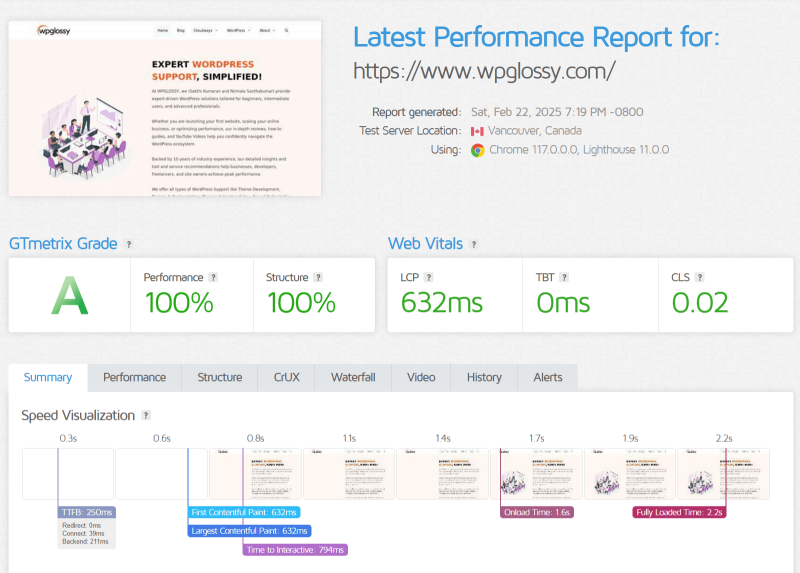
The cloud servers have the most brilliant speed features like,
- Multi-layer caching systems like Varnish, Memcached, and Redis. Besides, Nginx + Apache Hybrid stack to handle the static and dynamic files faster.
- Auto-healing servers and real-time monitoring to solve performance issues.
- Vertical scaling to manage traffic spikes.
Not only these, but Cloudways also has impressive qualities to speed up your website.
DigitalOcean

DigitalOcean has optimized droplets and load balancers for reduced response time. Moreover, it has managed Kubernetes for fast deployment. Its private networking for improved data communication is my favourite feature. However, you need to configure everything for the site speed optimization.
Winner: Cloudways
Verdict
DigitalOcean requires manual setup for CDN, Caching, HTTP/2, and vertical scaling. Cloudways undoubtedly provides users with excellent speed features and the finest settings preferences for a fast-loading site.
Performance
After putting in tons of hours behind building up a beautiful website, the last thing you want is for your website to be unavailable at all times. So, uptime is on the list of essential criteria. Let’s compare the two hosts and see who wins the battle in Cloudways vs DigitalOcean uptime performance.
Cloudways
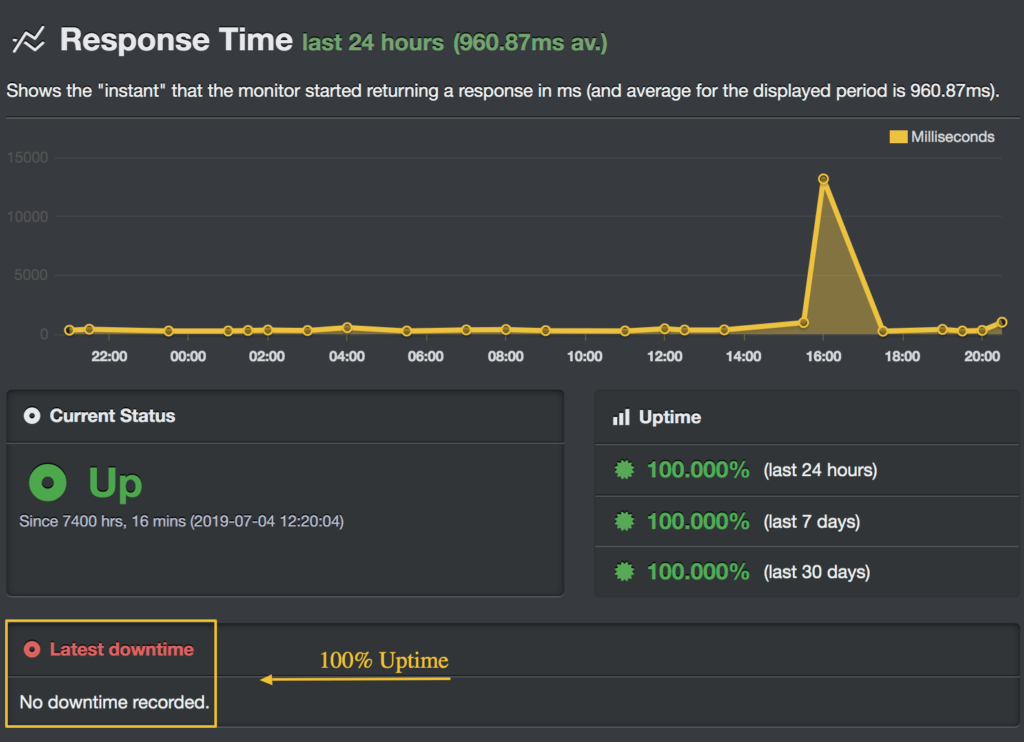
Cloudways understands your need to have the highest uptime. It will help you get the maximum score. The Auto-healing managed cloud servers technology ensures the website never crashes, and hence it does not affect its uptime.
DigitalOcean
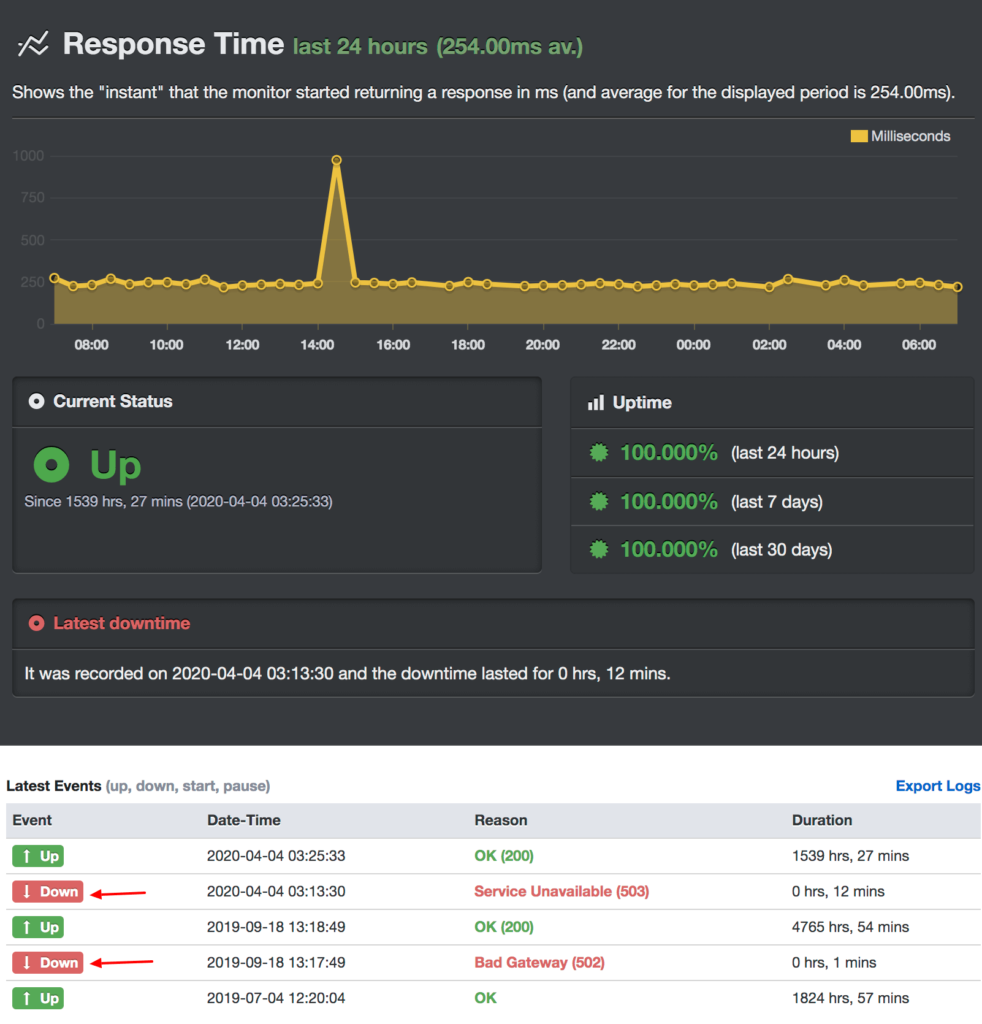
DigitalOcean also looks forward to helping you with the highest uptime, but it missed putting my website up at all times. Even with the great efforts they put in, I faced downtime issues a few times.
Winner – Cloudways
Verdict
Cloudways offers the highest uptime with the help of state-of-the-art servers. Managed hosting type handles the server-level tasks and optimizations to keep my blog live at all times.
WordPress Optimized Features
WordPress is the most popular CMS worldwide. Let us understand the various features availed by both companies and which beats the other in WordPress features.
Cloudways
Cloudways provides optimized solutions for WordPress sites. 1-click installer for easy deployment is my favorite WordPress feature. Moreover, I utilize its free cache plugin, Breeze, to boost my site speed. Its scalability feature, PHP support, and In-built cache system, migration plugin, and multisite hosting plan offer great support for WordPress sites. You must try its recently launched high-availability plan for fully managed WordPress.
DigitalOcean
Much like Cloudways, DigitalOcean also provides users with custom one-click installs, thus helping raise the bar regarding user experience. However, it fails to provide the users with specific applications that help boost the user experience in WordPress.
Winner – Cloudways
Verdict
We have a clear winner between Cloudways Vs DigitalOcean, and that surely is Cloudways for its dedicated features for WordPress users. Besides, it is easy to host a WordPress website on DigitalOcean without any technical tasks.
CDN
Which hosting contains better CDN features, Cloudways or DigitalOcean? Let me tell you!
Cloudways
Dependability and cheapness are undoubtedly the two things you can discuss when discussing CloudwaysCDN services. The CDN services can be easily integrated with any website with a few clicks. Cloudways makes itself one of the supreme companies in the market regarding CDN service delivery, dependability, and price.
Edge Page Caching (for WordPress) and Argo smart routing are my favorite features of Cloudways CDN. Select the application, configure Cloudflare, and point the Domain; that’s it. Here, you will get the advanced features like Image and mobile optimization for improved user experience.
DigitalOcean
DigitalOcean has a product named Spaces. It is a highly scalable object storage. Through this S3-compatible storage, you have to enable the CDN service to take advantage of its global edge caching to improve your site’s loading time. It will definitely reduce the bandwidth costs through their caching assets across 200+ distributed servers worldwide. However, it requires more manual work to set up everything.
Winner – Cloudways
Verdict
Cloudways is a winner as it has a cheap and readily usable CDN service partnership with the Cloudflare enterprise network. For Spaces CDN in DigitalOcean, you need to pay $5/mo which is higher pricing than Cloudways CDN.
Security
Blog or website security is a concern for every site or blog owner. Let us check out who beats the other in this part of the service.
Cloudways
Cloudways understands how important it is for users to have website security. For the same reason that Cloudways has the following features added to itself:
- Two-Factor Authentication helps to a great extent in growing the site’s security.
- 1-click free SSL installation for improved web security
- Regular OS patches are used to avoid vulnerabilities in the website
- SafeUpdates will automatically update your WordPress Core files.
DigitalOcean
This cheap cloud hosting provides an excellent cloud firewall, which protects my blogs against malicious attacks. Another feature worth mentioning is its private networking. Together, these features make DigitalOcean a secure competitor of Cloudways.
Winner – Both
Customer Support
I know you always look for a hosting company with an excellent customer support system. This is just because, no matter what, you would need them at some point. Let’s see which hosting has dedicated customer support.
Cloudways
Right from calling them up to discussing your problem over a live chat feature, you have all the opportunities to clear yourself. Also, they are available 24/7 to help you with anything, anytime. The queue is never too long, enabling you to save time when you need to get your problems sorted. Till now, the support team has assisted me well and suggested a couple of things to implement for the site’s betterment.
DigitalOcean
DO provides Email support, a Support Portal (With Q&As), and Social Media platforms to the customers. This surely is not a great customer service option. DigitalOcean should open the live chat and phone communication to get technical help from the professional staffs.
Winner – Cloudways
Verdict
DigitalOcean loses the battle even without a fight. A simple ticketing system and Q&A page are undoubtedly not good enough. Cloudways is the clear winner, as you can reach them anytime.
DigitalOcean Vs Cloudways Pricing
You would love to know how deep you might have to reach out when reaching into your pocket. So, let’s check the pricing of both companies.
Cloudways
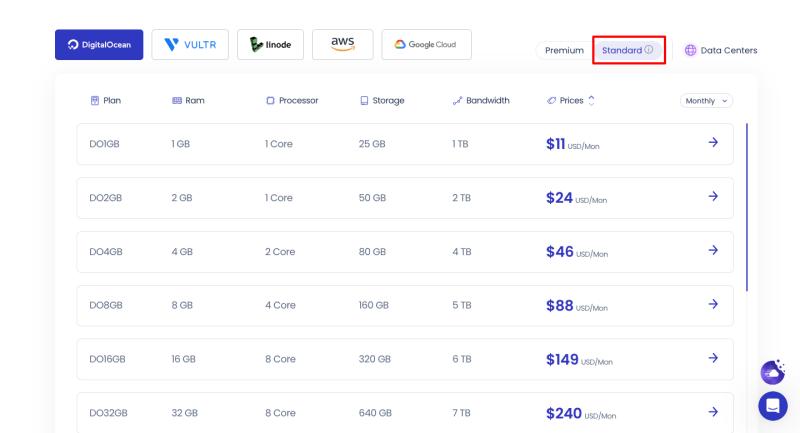
The basic pricing plan is $11 per month. While on the higher end, it reaches the level of $99 per month. Check the comparison Cloudways Premium Vs Standard plans of DigitalOcean to pick the right one.
The higher-paid cloud server comes with its own set of benefits. However, you can use our exclusive Cloudways promo code to get a $30 discount on your first month’s billing.
DigitalOcean
DigitalOcean comes up with many options to choose from, which helps you have the finest option set for yourself. Its price range starts from as low as $4 per month and here, you will get the high-efficient virtual machine droplets that can be deployed in seconds.
It has other pricing options like
- $1.99/GPU/hour (Scalable Machines)
- $12/mo (Managed Kubernetes)
- $15/mo (Fully managed Databases)
And much more plans with Load balancers, Spaces, Volumes, etc.
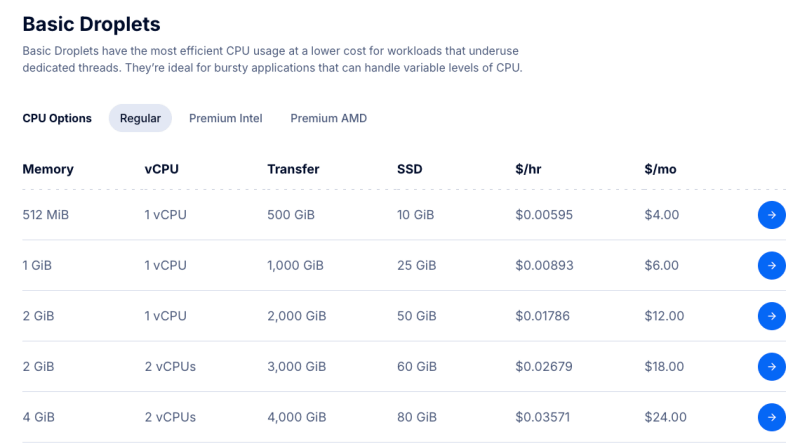
Winner – DigitalOcean
Verdict
DigitalOcean, with the set of available options, wins in this field as they have it all in themselves to give the customers exactly what they need. Besides, a $200 DO free credit is available which is valid for 2 months.
Ease Of Use
While clicking on the server website and getting the hosting done, one must not face difficulties. This primarily enhances the ease of use. Thus, we would compare the two competitors on that scale.
Cloudways
It’s easy and lucid; sometimes, it’s self-explanatory. This is possibly the best way I can explain the user experience of Cloudways. If you are not one of the geeky nerds, you surely would love how you can move across the server and the website with self-explanatory options and settings. Webroot application and the backup and restore facilities are features that would be at your fingertips while using this server.
DigitalOcean
When you started using Cloudways once, you would not love or appreciate the flow of events in DigitalOcean. Sometimes, it just seems too techy, and you might have to Google the meanings of individual words to ensure you don’t mess up badly with the settings. You have to put a lot of effort into setting things up. Manual configuration is essential here.
Verdict
Cloudways wins this segment quite comprehensively. DigitalOcean would have to work harder to close to Cloudways in this segment.
Cloudways or DigitalOcean – Who Is The Hosting Champion?
Overall, Cloudways inevitably emerges as a clear winner, as not only have they won in several of the points stated, but they have also won by a considerable margin. A plethora of features make Cloudways the best in the business.
The most critical areas, such as speed, uptime, and security, are dominated by Cloudways. Thus, I’m telling this managed cloud hosting as the champion in the battle of Cloudways vs DigitalOcean.
If you are a beginner, try to dig a little further into your pockets to get Cloudways. It is also a delight for experienced users as they can follow through the functions more easily, saving time and effort.
However, if you are tightly bound with your finances and can comfortably handle the back-end server tasks, choose DigitalOcean. Still, even then, it would be highly recommended that you get your website hosted by Cloudways.

Amazed to read such awesome and amazing blog. The blog is very useful and interesting as well.
I really appreciate this wonderful post that you have provided for us. Thank you for sharing, this is help me so much in my learning