

With so many performance-focused WordPress themes available today, one question keeps coming up to me: Which theme is actually the fastest: Astra, GeneratePress or Kadence?
I’ve been blogging since 2010 and have built & managed several WordPress websites. I used popular WordPress themes to understand which one genuinely improves website performance.
From my experience, these three themes consistently rank among the best lightweight WordPress themes available.
They’re regularly recommended because they focus on clean code, modular design, and performance optimization rather than flashy animations or unnecessary features.
However, marketing claims don’t reflect real-world performance!
That’s why I decided to run my own speed tests using Astra, GeneratePress, and Kadence under identical conditions.
I have tested each theme on the same WordPress installation with identical content, the same hosting server, and the same performance testing tools.
This theme comparison focuses entirely on speed performance. I’ll compare metrics like
- GTmetrix Performance Score
- CSS and JavaScript Assets
- HTML Output
- Page and DOM Size
By the end of this blog post, you’ll know which is the fastest WordPress theme to build your dream WordPress website.
Disclosure: We get a commission when you buy a product via our affiliate link at no additional cost.
Table Of Contents
Does Your WordPress Theme Affect Website Speed?
The biggest myth in WordPress is that your hosting or caching plugin is the only thing that improves the site speed. Actually, your theme still plays a critical role in loading speed. A lightweight theme offers:
- Smaller CSS files
- Minimal JavaScript
- Cleaner HTML markup
- Fewer HTTP requests
- Lower DOM size
- Faster rendering
- Better Core Web Vitals
Although the differences may be only a few hundred milliseconds, they become more noticeable when your website grows and you install additional plugins.
Test Environment
I have used the following setup for all benchmarks.
| Component | Configuration |
| WordPress Version | Latest Stable Release |
| PHP Version | PHP 8.3 |
| HTTPS | Enabled |
| Hosting | Cloudways |
| CDN | None |
| Cache Plugin | Disabled |
| Image Optimization | Disabled |
| Sample Content | Identical |
| Test Tool | GTmetrix |
| Test Location | Vancouver, Canada |
| Browser | Chrome |
By disabling caching and optimization plugins, the benchmarks reflect the raw performance of each WordPress theme rather than the effects of external optimizations.
Astra Speed Test Results
Astra is my top recommendation for those who want a balance between speed, flexibility, and ease of use.
I’ve deployed Astra on client websites and personal projects. In my experience, it delivers reliable performance without extensive out-of-the-box optimization.
One of Astra’s biggest strengths is its modular architecture. Rather than loading every available feature on every page, it loads only the assets needed when they’re actually used.
This keeps CSS and JavaScript payloads relatively small and reduces unnecessary HTTP requests. When tested under identical conditions, Astra delivered excellent results across all key performance metrics.
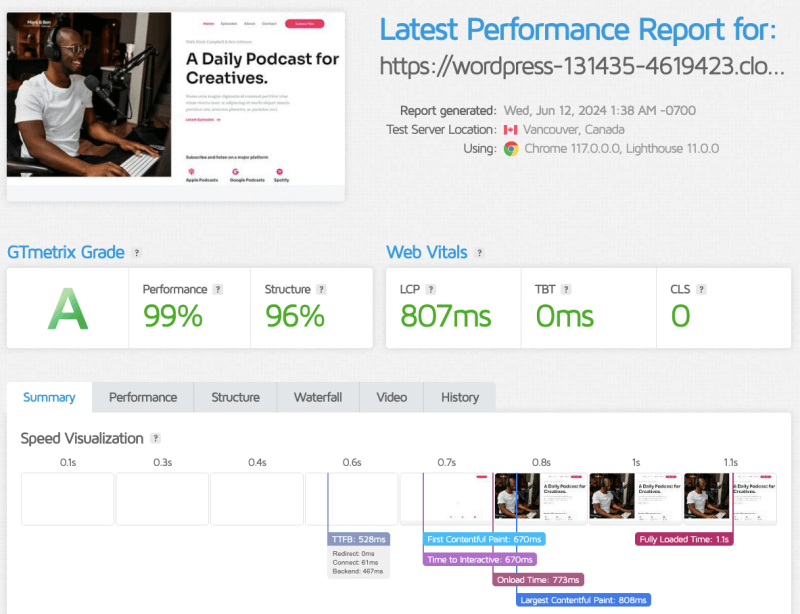
HTML Output
One of Astra’s key strengths is its clean and well-structured HTML markup. During my testing, the generated code remained lightweight and avoided unnecessary wrapper elements, helping keep the Document Object Model (DOM) relatively small.
This streamlined structure enables browsers to parse and render pages more efficiently, resulting in faster load times.
CSS & JavaScript
Astra follows a modular approach to asset loading, ensuring that only the CSS and JavaScript required for the active features are loaded. Instead of forcing every visitor to download unused files, the theme minimizes unnecessary assets and reduces overall page weight.
Benefits:
- Smaller CSS and JavaScript payloads
- Fewer HTTP requests
- Reduced render-blocking resources
My Impression
Astra delivers an excellent balance between performance and flexibility. Its modular architecture, clean codebase, and efficient asset loading make it as the fastest WordPress theme..
For users who want strong performance without sacrificing design options, Astra remains a reliable choice for blogs, business websites, and WooCommerce stores.
GeneratePress Speed Test Results
GeneratePress is the lightweight WordPress theme to build fastest websites. I’ve used it on affiliate websites and content-heavy blogs, particularly on sites where speed is my top priority.
In my experience, it consistently delivers some of the fastest loading times without requiring extensive optimization.
GeneratePress follows a minimalist philosophy. It avoids unnecessary animations, bulky frameworks, and excessive styling.
This approach helps reduce unnecessary CSS and JavaScript, resulting in fewer HTTP requests and a smaller page size.
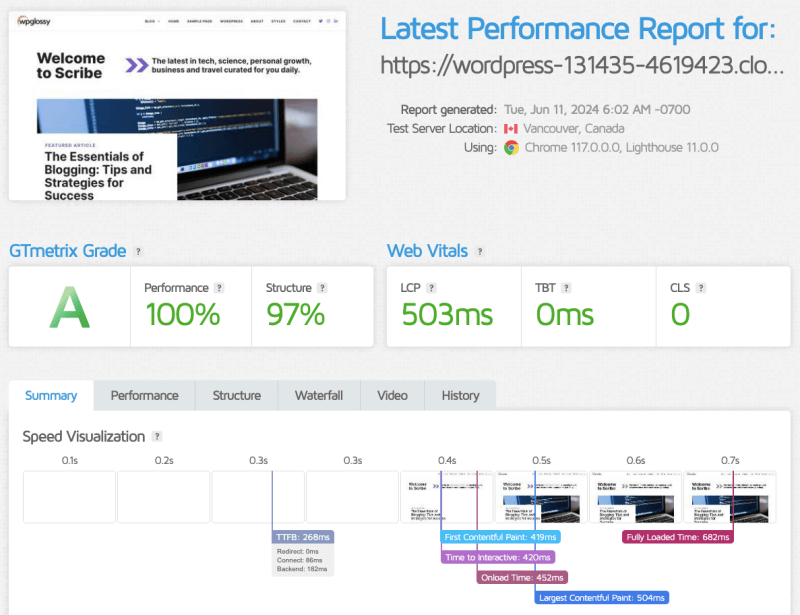
My test site was loaded quickly, even before any caching plugin or CDN was enabled.
This shows that the theme itself has been carefully designed for performance rather than relying on external optimization tools.
HTML Output
One of the first things I noticed while testing GeneratePress was its clean HTML structure.
The markup is concise, avoids unnecessary wrapper elements, and keeps the Document Object Model (DOM) relatively small.
CSS & JavaScript
GeneratePress has long been known for its tiny CSS footprint.
Instead of loading a large stylesheet filled with features you may never use, it keeps the core CSS remarkably compact and the same rule is followed for JavaScript as well.
Benefits:
- Smaller CSS downloads
- Reduced render-blocking resources
- Faster browser rendering
- Improved mobile performance
My Impression
Based on my testing, GeneratePress continues to justify its reputation as one of the fastest WordPress themes available.
Its clean architecture, minimal codebase, and efficient asset loading make it an excellent choice for bloggers, developers, and everyone who cares about website performance.
Kadence Speed Test Results
Kadence has become the fastest-growing WordPress theme in recent years. It aims to provide a richer design experience while still maintaining strong performance.
This theme contains an advanced header builder, global color controls, dynamic layouts, and deeper customization options directly within the WordPress Customizer.
Naturally, the question is whether these additional features come at the cost of speed. To find out, I tested Kadence under the same conditions as Astra and GeneratePress.
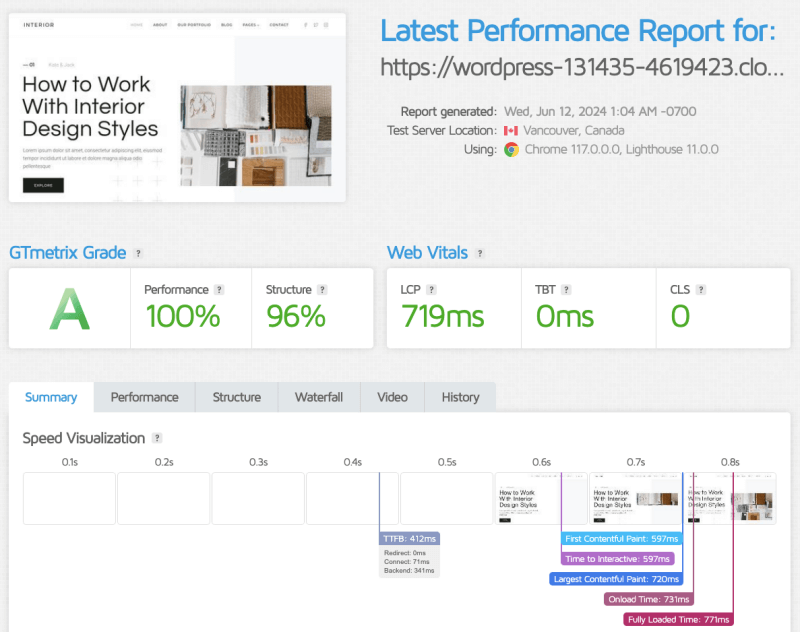
Kadence also produced excellent GTmetrix results.
Although its overall performance score was very similar to the other two themes, the underlying metrics reveal small differences that become more noticeable when examining page size, asset loading, and total requests.
HTML Output
Kadence generates clean, semantic HTML that is easy for browsers to process.
Because it includes additional layout and customization options, the HTML output can sometimes be slightly larger than that of GeneratePress. However, during normal browsing, this difference is generally too small for users to notice.
CSS & JavaScript
Kadence includes more built-in styling options than GeneratePress, which naturally results in a slightly larger CSS footprint.
With additional functionality, it maintains a relatively lightweight codebase compared to many traditional multipurpose WordPress themes.
My Impression
Kadence delivers an impressive balance between design flexibility and performance.
If you prefer having more customization options built directly into your theme, the slight increase in page size may be a worthwhile trade-off.
GTmetrix Performance Comparison
After testing all three themes under identical conditions, I compared the key GTmetrix metrics side by side!
| Metric | Astra | GeneratePress | Kadence |
| Performance Score | 99% | 100% | 100% |
| TTFB | 528ms | 268ms | 412ms |
| Largest Contentful Paint | 807s | 503ms | 719ms |
| Fully Loaded Time | 1.1s | 682ms | 771ms |
| Total Blocking Time | 0 ms | 0 ms | 0 ms |
| Total Page Size | 50 KB | 41KB | 55KB |
| HTTP Requests | 12 | 9 | 15 |
CSS And JavaScript Performance Breakdown
While GTmetrix and PageSpeed Insights give useful high-level scores, the real differences between Astra, GeneratePress, and Kadence become clearer when we break down how each theme handles CSS, JavaScript, and front-end rendering.
One of the most important indicators of a lightweight WordPress theme is total CSS payload.
| Theme | CSS Approach | Relative Weight |
| Astra | Modular + conditionally loaded CSS | Low |
| GeneratePress | Minimal core stylesheet | Very Low |
| Kadence | Feature-rich global styling system | Low to Moderate |
What I Observe?
- GeneratePress has the smallest overall CSS footprint and uses the minimum JS. Its aim is to focus on minimal styling and let the browser render content quickly without heavy design layers.
- Astra keeps CSS modular and only loads what’s needed per page, which helps keep performance strong even on larger sites. It uses slightly more JS to support features like sticky headers and layout enhancements, but still keeps it efficient
- Kadence includes more design controls which slightly increases CSS weight, though still far lighter than traditional multipurpose themes. It also adds additional scripts for advanced UI features.
From a performance engineering perspective, CSS size directly affects render-blocking time, which influences First Contentful Paint (FCP) and Largest Contentful Paint (LCP). And, heavy JavaScript can delay Interaction to Next Paint (INP).
Page Size & DOM Complexity
Page size and DOM structure directly affect rendering speed.
| Theme | Page Size | DOM Complexity |
| GeneratePress | Smallest | Very Clean |
| Astra | Small | Clean |
| Kadence | Slightly larger | Moderately complex |
What do I observe?
- GeneratePress produces the smallest and cleanest output overall.
- Astra remains highly optimized while supporting more design flexibility.
- Kadence introduces slightly more DOM elements due to its advanced layout system.
A smaller DOM generally improves rendering speed and reduces layout recalculations in the browser.
How To Make Your WordPress Fast With Any Theme?
You can significantly improve the site speed regardless of the theme you install by following the steps below!
- Use reliable hosting with a stable TTFB and CDN
- Install a cache plugin
- Optimize your database and fonts
- Minimize and combine CSS and JS
You can further optimize your site for WordPress speed by following my detailed guide!
Performance Verdict
After testing all three themes under identical conditions, the results are extremely close.
Fastest Overall Theme: GeneratePress! It wins in speed performance.
It consistently delivers:
- Smallest CSS footprint
- Fewest HTTP requests
- Cleanest HTML output
- Lowest overall page size
- Minimal JavaScript execution
If your only priority is maximum speed and Core Web Vitals performance, GeneratePress is the best choice.
Astra comes very close to GeneratePress in performance while offering more built-in flexibility. Kadence is feature-rich, but slightly heavier than GeneratePress and Astra.
Frequently Asked Questions
Which is the fastest WordPress theme in 2026?
Based on my tests, GeneratePress is the fastest WordPress theme due to its minimal CSS, JavaScript, and HTTP requests.
Is Astra faster than Kadence?
Yes, slightly. Astra generally loads faster due to a smaller asset footprint, but the difference is minor in real-world use.
Does a WordPress theme affect Core Web Vitals?
Yes. Your theme influences LCP, INP, CLS, page size, and render-blocking resources.
Can all three themes achieve 100 PageSpeed score?
Yes. With proper optimization, all three can achieve near-perfect PageSpeed Insights scores.
My Final Conclusion
Astra, GeneratePress, and Kadence are all excellent lightweight WordPress themes that prioritize performance.
While GeneratePress technically leads in raw speed, Astra and Kadence offer slightly different advantages in usability and design flexibility.
If your goal is pure performance optimization, GeneratePress is the best choice. If you want a balance between speed and features, Astra or Kadence may be more practical depending on your workflow.
Before getting into the speed scores of each theme in the Free and Premium versions, let me describe the speed features of each theme.



Great in-depth comparison! Speed is such a crucial factor for any website, especially when it comes to user experience and SEO. I’ve personally used both Astra and GeneratePress in various projects, and while Astra offers fantastic customization options, GeneratePress has always been my go-to for minimalistic and fast-loading sites. It’s interesting to see Kadence performing so well in this test—might have to give it a try in my next project. Thanks for shedding light on these differences!
I just finished reading your comparison of Astra, GeneratePress, and Kadence, and I have to say, it was a fantastic read. I’ve been mulling over which theme to use for my next project, and your insights on speed really cleared things up for me. It’s fascinating to see how these themes stack up against each other in terms of performance. Your detailed analysis not only highlighted the strengths and weaknesses of each but also gave a great perspective on what might work best depending on the specific needs of a site.
Another interesting plugin for image optimization:
https://wordpress.org/plugins/optipic/
OptiPic automatic convert image to Webp (for webp-supported browsers) and compressed/optimized png/jpeg (for webp-unsupported browsers).