
This blog was hosted on the Cloudways DigitalOcean server from 2017 to 2021. To boost performance and pass Core Web Vitals assessments, I moved to a high-frequency Vultr server.
For over a decade, I have managed more than 40 websites (my own and client sites), and since 2017, I’ve been using Cloudways as my primary cloud hosting platform.
I tested DigitalOcean (DO) and Vultr servers on real websites. I analyzed how they behave under traffic spikes, WooCommerce checkouts at busy hours, and after WordPress core updates.
This Cloudways DigitalOcean Vs Vultr comparison is based on actual experience, real performance, and case studies for my clients. It will help you choose the right server without having to guess.
Disclosure: We get a commission when you buy a product via our affiliate link at no additional cost.
Table Of Contents
Cloudways DigitalOcean Vs Vultr – Quick Comparison
Here is a quick comparison between Premium Cloudways DO and HF Vultr to help you gain a clear understanding.
Features | Cloudways DO | Cloudways Vultr |
Pricing | $12/mo (Premium) | $13/mo (High Frequency) |
RAM, Storage & Bandwidth | 25 GB Storage | 32 GB Storage |
Our Uptime Status | 99.9% | 100% |
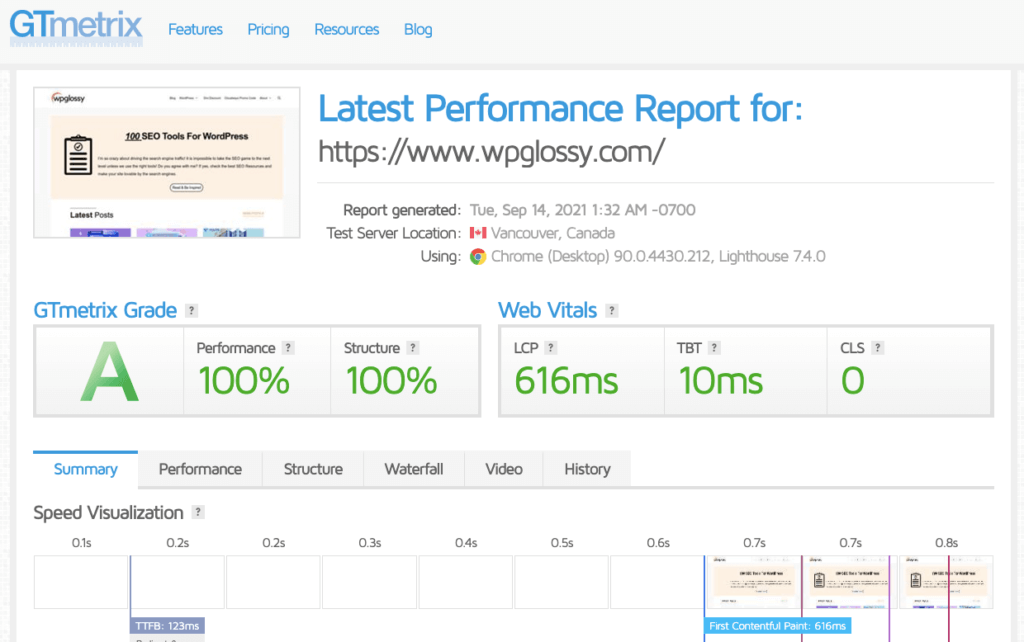
Speed Performance | 100% In GT Metrics (LCP 616 ms) | 100% In GT Metrics (LCP 473 ms) |
Core Web Vital Assessment | We Didn't Pass | We Passed |
Stablity | Not Highly Stable In High Traffic | Very Stable In High Traffic |
Server Availablity | Highly Available | Sometimes Unavailable |
WooCommerce Performance | Not Impressive | Great Results |
My Quick Verdict
- For blogs, content sites, service websites → DigitalOcean is ideal
- For WooCommerce, LMS, membership sites, high-traffic sites → Vultr HF wins by a clear margin
Vultr HF is noticeably faster, especially for dynamic workloads. However, DigitalOcean is more predictable and budget-friendly. Both are great, but suitable for different requirements.
Cloudways DigitalOcean vs Vultr – Overview
Let’s take a look at the overview of both hosting packages. Then I’ll compare the key features and performance results of DigitalOcean and Vultr cloud servers from Cloudways hosting.
DigitalOcean Overview
Cloudways DigitalOcean is a simple, reliable, affordable hosting plan for website owners, business people, and developers. With this hosting, it’s easy to get your website up thanks to its simple UI. It offers its users multiple custom features that can benefit your business.
Vultr Overview

Cloudways Vultr is a feature-packed hosting plan designed for startups, agencies, and large enterprises to deliver a robust online presence. With Vultr, you can focus on the technical aspects of managing your sites without stress. Vultr cloud server offers several solutions to boost your online business.
Performance
DigitalOcean Speed
Cloudways DO offers fast and reliable performance, which is why it is a popular choice among users. It uses high-speed SSDs, and its data centers are strategically located worldwide. This excellent feature reduces the overall response time and improves website speed and performance.
Vultr speed
Cloudways Vultr offers powerful cloud servers optimized for speed and low latency. It provides various features, SSD-based servers, and Cloudflare CDN for optimal performance. Aside from these features, you can expect a fast loading speed for its optimization with advanced caching.
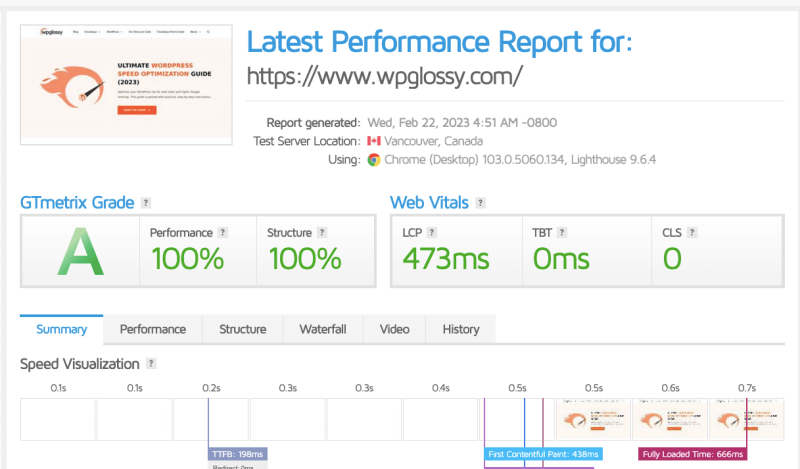
Winner – Cloudways Vultr
I compared two DigitalOcean and Vultr HF using
- Astra theme
- Cloudflare
- WP Rocket
- PHP 8.2
- Redis enabled
Here’s the average TTFB performance:
TTFB (Global Average)
| Region | DigitalOcean | Vultr HF |
| Canada | 110–140 ms | 80–110 ms |
| Europe | 130–170 ms | 95–130 ms |
| India | 150–220 ms | 120–180 ms |
| Australia | 180–250 ms | 150–210 ms |
Cloudways Vultr High Frequency server wins across all regions.
Ease of Use
DigitalOcean Ease of Use
Cloudways DO is known for its simplicity and ease of use, thanks to its intuitive control panel. It offers an intuitive user interface, making content creation and management accessible. If you are a novice, you can visit their learning or knowledge base page to learn and get started quickly.
Vultr Ease of Use
Cloudways Vultr also offers a simple and intuitive user interface, making it easy to maintain their websites. With Vultr, you can easily manage your servers and create backups. However, some users have complained that Vultr’s user interface can sometimes be confusing to work with.
Winner – Cloudways DigitalOcean
Security
DigitalOcean Security
Cloudways DO provides robust security features, including a free SSL certificate. So, your website is safe for your visitor, and their data remains secure. They also have dedicated firewalls and perform regular security patches. Some other options Cloudways DO offers are:
- Auto-healing
- Automated backups
- 2F authentication
Vultr Security
Cloudways Vultr offers the same security features to its users, including 2F authentication. It provides free SSL certificates and automated backup options to ensure user and data safety. Additionally, Vultr offers DDoS protection to help mitigate attacks, malicious traffic, and malware.
Winner – Both
Cloudways DigitalOcean Vs Vultr – Pricing
Note: Both DigitalOcean and Vultr plans offer exclusive discounts. Use the Cloudways official coupon to get the highest sale offer.
DigitalOcean Pricing
Cloudways DigitalOcean offers simple and predictable pricing, with hourly and monthly plans that pay only for what you use. You can choose from multiple options on the standard plan, ranging from $11 to $88 per month. However, choose the package that best suits your needs, taking into account your budget.
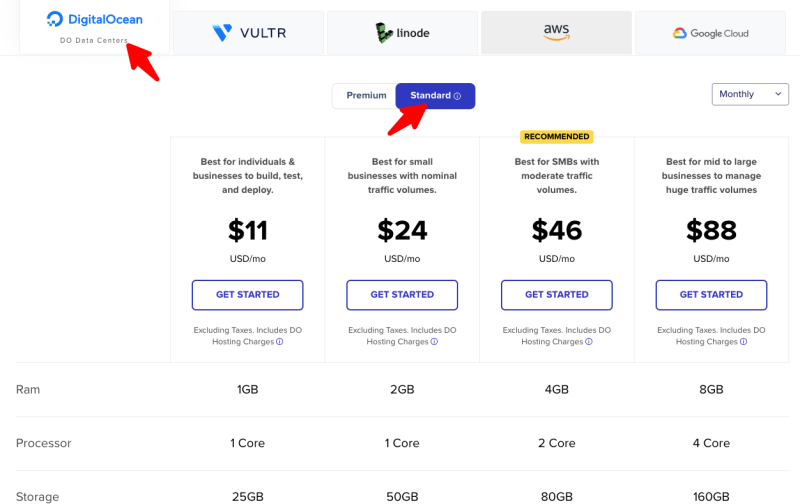
You can see the two different pricing structures in the Cloudways DigitalOcean server; don’t get confused. I have explained the difference between the Cloudways DO Premium Vs standard plans. I hope you will go through it, and buy the best one that meets your requirements.
Vultr Pricing
The pricing of Cloudways Vultr is affordable and transparent, with a pay-as-you-go model. Its overall cost depends on the resources you want to use, such as CPU, RAM, and storage. On the standard plan, you can choose a range of resources priced between $14 to $99 per month.
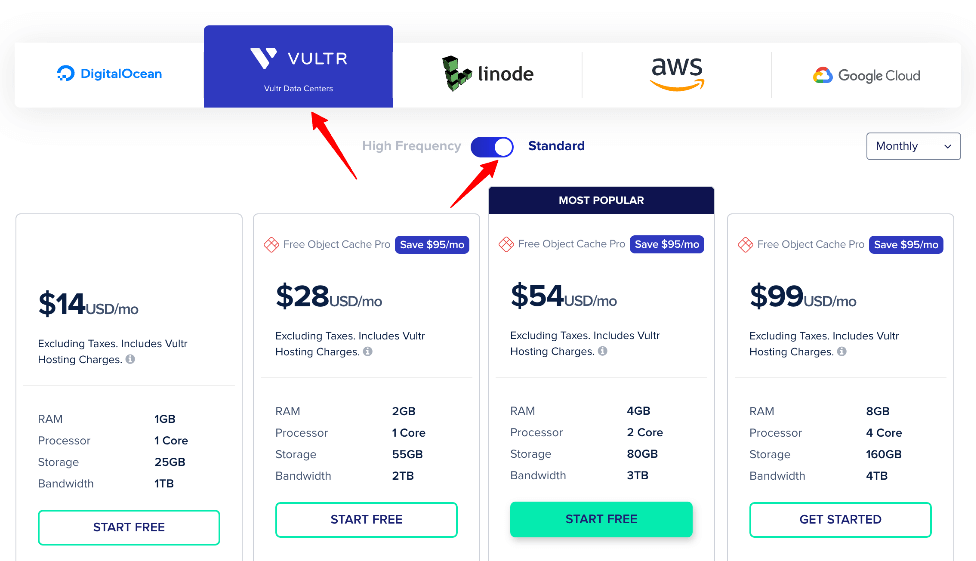
Look at the difference between the High Frequency and Standard Cloudways Vultr plans. I know you will get a suitable plan to host your business site. You need to spend $3 extra compared to DO Premium and use a superior server.
Winner – Cloudways Vultr
Cloudways DO Vs Vultr – Pros & Cons
Let me consolidate the positives and negatives of both servers; I hope it will help you get a suitable server for your business website.
DigitalOcean Pros & Cons
Pros
- Powerful cloud infrastructure
- Simple and affordable plans
- User-friendly control panel
- Very stable performance
- Advanced security features
Cons
- Limited customization options
Vultr Pros & Cons
Pros
- High-performance cloud servers
- Simple and intuitive control panel
- Quick response time (Very low LCP and 0 TBT)
- Best TTFB from Auto-healing servers
- Multiple datacenter locations
Cons
- Slightly expensive
Can You Move From DigitalOcean To Vultr In Cloudways?
Yes! You can do it!
I have implemented the same approach to achieve a performance boost. However, it involves technical procedures and needs to be completed carefully. You need to change the IP and the data center.
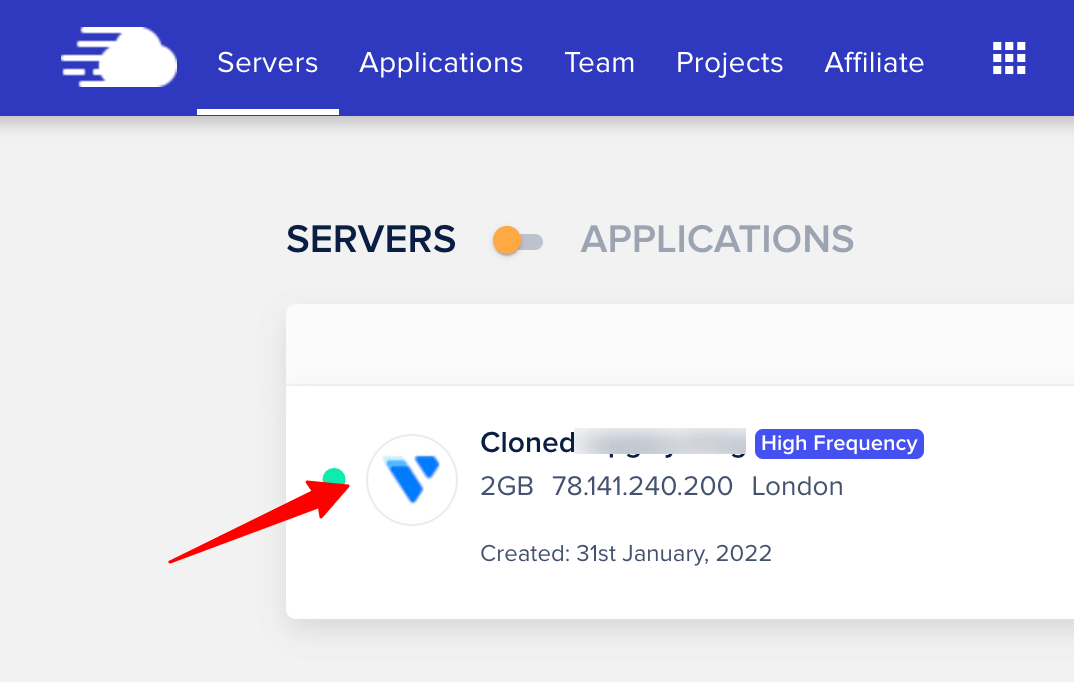
I approached Cloudways support and requested a change to the DigitalOcean server, specifically to a 2GB high-frequency Vultr server in London, to balance our US and Indian audiences. They have done the server cloning and asked us to update the DNS to point our domain to the new IP.
Cloudways DigitalOcean And Vultr Servers – FAQs
Which is Better, DigitalOcean Or Vultr Cloudways?
Both cloud servers offer excellent performance. You should pick the one that suits you, depending on your preferences and requirements. If you have static websites and a decent budget, go for DO droplets. If you want to host a WooCommerce site, LMS site, or Forum, go with the HF Vultr to get great speed and uptime results.
Is Vultr Cheaper Than DigitalOcean?
No! Vultr is slightly expensive than DigitalOcean. However, you can use the exclusive coupon code – WPGLOSSY – for a 30% discount.
Which Is The Fastest Cloud Server?
The high-frequency Vultr server is a top-notch, speedy server that helps us pass CWV assessments. I always strive to achieve a superfast loading site to improve our Google rankings.
Which Has Simplified Sever Deployment Settings?
When comparing the settings of Vultr and DigitalOcean on Cloudways, DigitalOcean has more straightforward settings for server deployment and vertical scaling.
Cloudways Vultr vs. DigitalOcean: Which has more data centers?
Vultr has extensive data centers with low-latency servers when compared to DO. If you are from the US, UK, or India, your choice should be HF Vultr Cloudways server.
Cloudways DigitalOcean Vs Vultr – Conclusion
Cloudways is a leading managed hosting solution that offers plans on DigitalOcean and Vultr. Choosing between DigitalOcean and Vultr cloud servers from Cloudways hosting depends on your website requirements.
DO is a good choice for users who need affordable and scalable infrastructure with a simple user interface. However, Vultr is ideal for users who want high-performance cloud servers and dedicated resources.
My Cloudways DigitalOcean vs Vultr comparison will help you choose the right cloud server. Beginners can go with Cloudways DigitalOcean. If you are a medium to large-sized business, Cloudways Vultr server is the ideal choice.