

As a WordPress designer, one of the questions I hear most often is, “Should I use Divi or Astra theme?”
I’ve worked with both themes on many websites, and each has its own strengths. The best choice depends on what you’re looking for like easy design tools, better speed, flexibility, or value for money.
In this article, I’ll share my experience with both themes and help you decide which one is right for your website.
Before getting into the details, I want to note that this evaluation is based on my personal experiences & views, and may therefore conflict with others’ viewpoints.
Let’s begin the Astra Vs Divi war through a quick comparison table.
If you’re not in the mood to read my detailed content, I hope it still helps you find the perfect WordPress theme for your business website.
Disclosure: We get a commission when you buy a product via our affiliate link at no additional cost.
Divi Vs Astra Pro – A Rapid-Fire Comparison
| Feature | Divi | Astra |
| Free Version | No | Yes |
| Premium Version | Yes | Yes |
| Visual Builder | Included | Requires Page Builder |
| Theme Builder | Yes | Limited |
| Divi AI | Yes | No |
| Starter Templates | 1000+ Layouts | 300+ Templates |
| Speed | Good | Excellent |
| Core Web Vitals | Good | Excellent |
| WooCommerce Support | Excellent | Excellent |
| SEO Friendly | Yes | Yes |
| Learning Curve | Medium | Easy |
| Lifetime Pricing | Yes | Yes |
| Best For | Designers & Agencies | Bloggers & Performance-Focused Sites |
Why Choose Divi Over Astra?
- Building a professional-looking website with a personalized touch for huge conversions is just a piece of cake.
- You will take full design control to customize your business site for branding, helping you gain a loyal audience.
- It’s simple to remove the Divi sidebar, change the Logo, Add Google Maps, and edit its footer for personalization.
- Easy to make your website more engaging with the help of social media tools, Monarch, Popup optin, Bloom.
- You don’t need to rely on heavy third-party plugins when Divi’s built-in Divi builder has everything you need.
- It has a split-test system to maximize results, but this feature is not available in Astra.
- You can create the Author box to improve your EEAT score.
Check out my in-depth Divi review to see its priceless value!
Why Go with Astra Than Divi?
- Astra is a weightless, performance-optimized theme compared to Divi.
- You will acquire relaxing customization options and the freedom to pick your preferred page builder.
- Even with the free version of Astra, it is more likely to build eye-catching websites (no free version for Divi)
- This WP theme is best suited for building distraction-free online course websites with integrations such as LifterLMS or LearnDash.
- The blog layouts, custom layouts, site layouts, global design options, and Header & Footer designs are excellent resources for building engaging sites that attract a dedicated readership.
Read my Astra Theme Review before finalizing things!
Divi Vs Astra WordPress Theme – Complete Comparison.
Now, it’s time to begin comprehensively comparing Astra Vs Divi to declare the theme winner under each category!
#1 Intuitive interface – Which theme is easy to work with?
Make sure you pick the one with easy-to-use options for customizing your site’s design. Let’s look at the user interfaces of Divi and Astra and choose the best theme for ease of use.
Divi
The new visual interface of the Divi theme is easy to use since it is highly customizable and clutter-free. When you get into the intuitive builder interface for the first time, you may feel mystified because this theme differs from the default WordPress editor.
However, there is nothing to worry about! WordPress developer experts have developed it with comfort in mind. Just be prepared to use the new website design system and be ready to learn the essential matters through documentation and video tutorials.
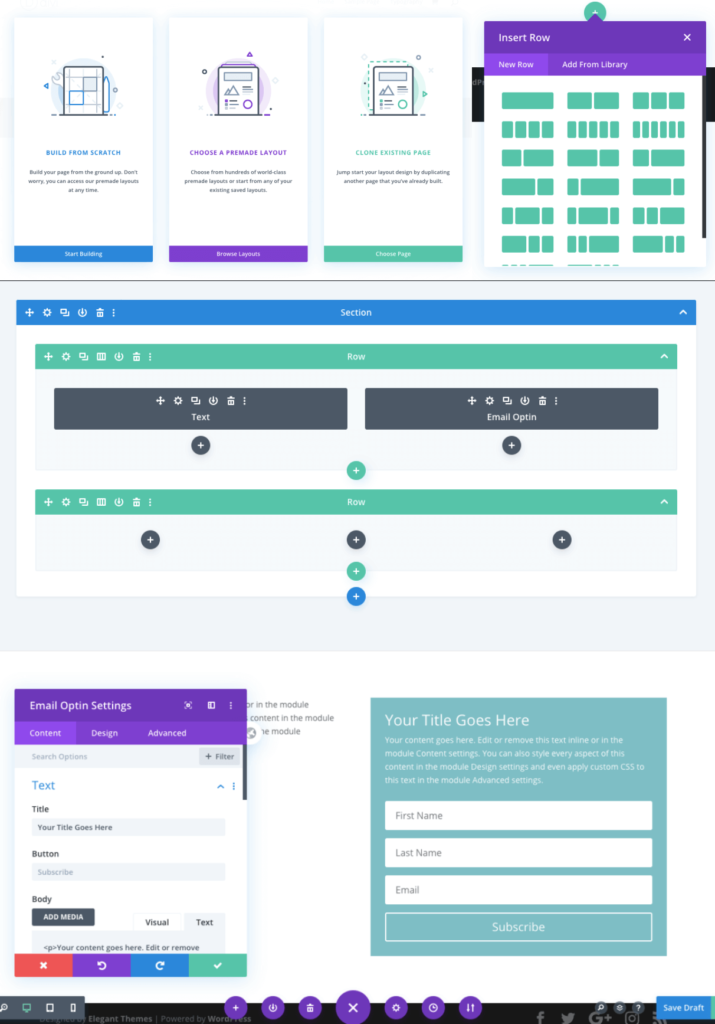
The updated version of the Divi builder offers new functionality to enhance your productivity and design speed. You will have access to all features directly in the WordPress admin, and you can switch back to the classic editor whenever you find it difficult.
If you ask about my experience with the Divi interface, I would say that I feel more relaxed within the post editor and on the front-end live customizer, so that I can see what I am doing and undo the settings when I mess things up.
Astra
Earlier this year, Astra launched an ambitious update that significantly improved the user interface, offering a crystal-clear feature set that makes the design process more accessible than ever.
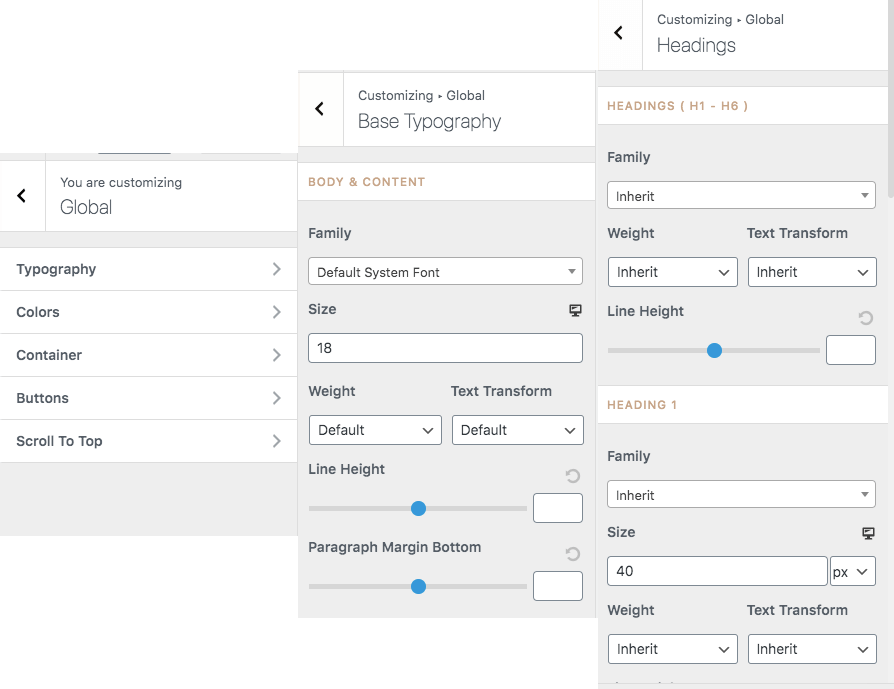
It has a clutter-free interface where you can find all theme settings in the customizer. Everything has been consolidated into a single place, organized into categories to ease the process and minimize clicks.
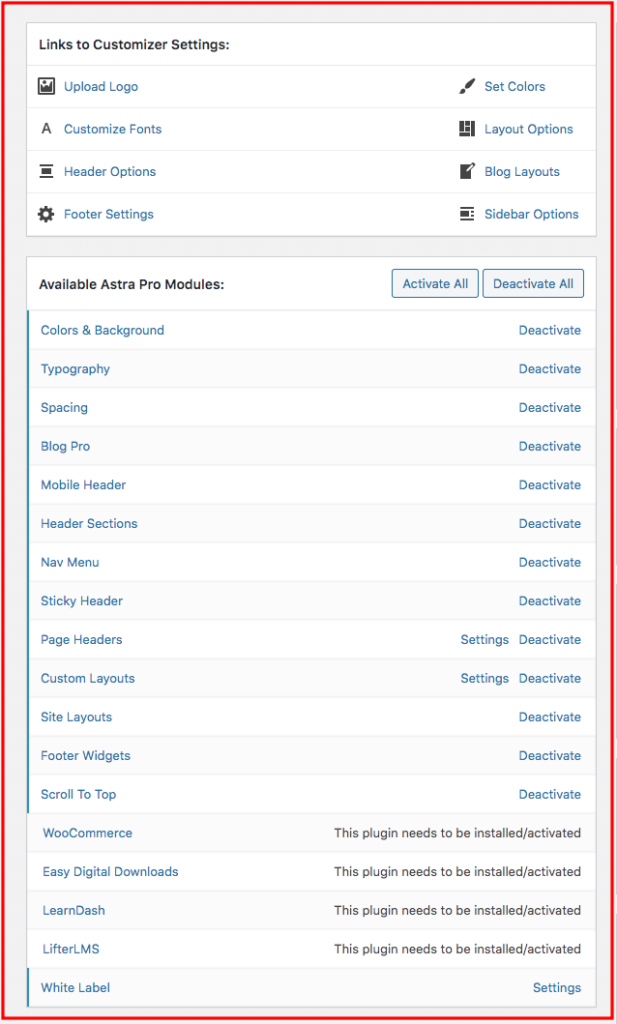
After activating the Astra Pro version, go to WordPress Dashboard > Appearance > Customize or Astra Options and start designing.
The entire section (Header, Footer, Sidebar, & Content) can be customized, including color & typography, in one place. The customizer option will load only when you click to edit it.
Winner – Astra
Reason – If you want a better theme interface with uncluttered settings to create a dazzling website, your pick should be the Astra WP theme, since it offers an improved interface with crisp setting options under one hood.
#2 Design Options – Which theme has Valuable design controls?
When you buy a WordPress theme, you should review its design choices, which are essential for achieving a better look that pleases search engines and your audience.
Divi
The Divi design elements are excellent, and you will have control over everything. There are 800+ pre-made designs, 40+ modules, and thousands of design options.
I love the accurate, visual, yet responsive real-time editing, where I can see the results simultaneously.
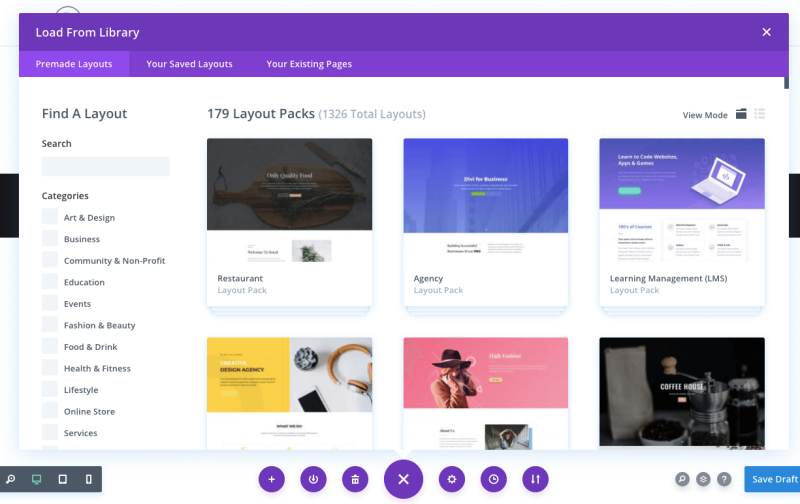
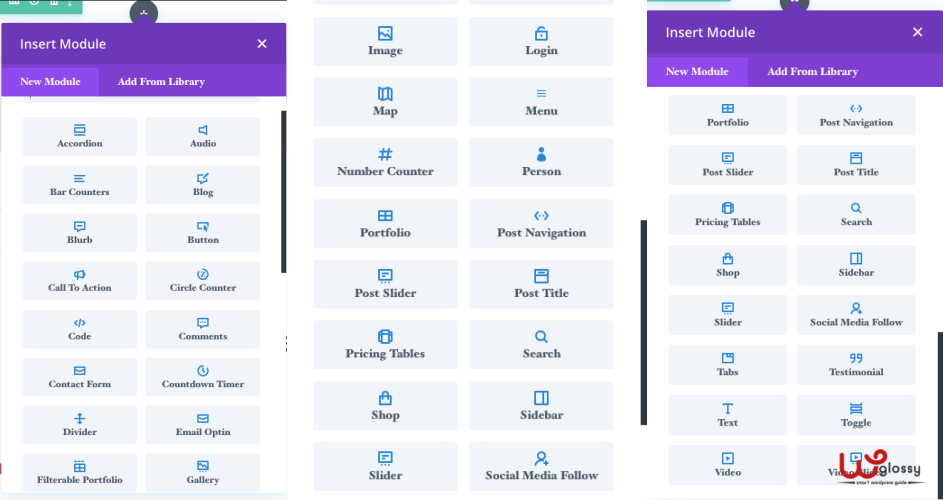
You can touch almost every part of the website and get a preferred design that reflects your business brand. Some efficiency tweaks, such as filterable & searchable settings, keyboard shortcuts, quick actions, find-and-replace styles, a color manager, and bulk editing, will save us valuable time.
Of Divi’s vast design choices, a few are my all-time favorites. they are
- Animations for high user engagement.
- Text shadows for the eye-pleasing effect.
- Filters and special effects of changing the elements’ appearance.
- CSS code editing to add my code.
- Transform controls & effects for graphic designing.
- Border options to make the elements noticeable.
- Use shape dividers to create transitions between content blocks.
As far as I know, no WordPress theme on the market offers this many design options; it is simply a fantastic job by Elegant Themes.
Astra
Astra’s design features are limited compared to Divi’s. However, all the essential controls are present and work well, allowing page builders to achieve the desired output.
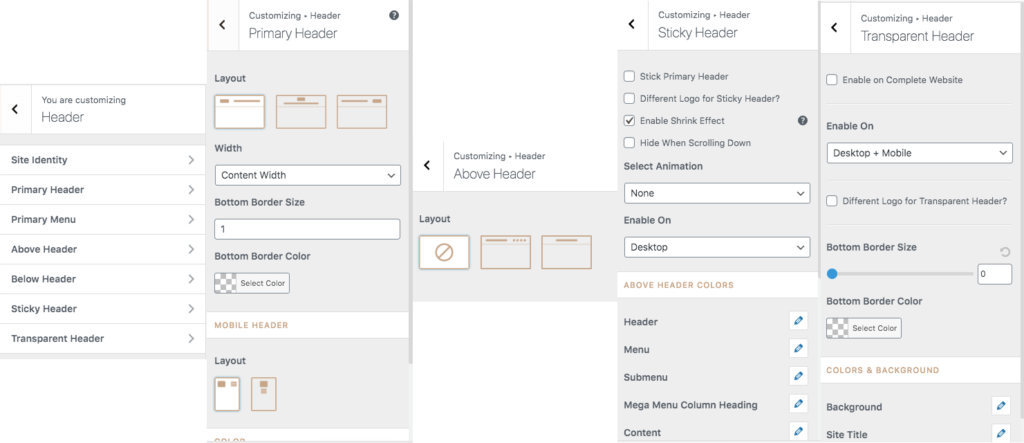
The site layouts, blog layouts, typography, header, and footer designs are fabulous since they have maximum flexibility.
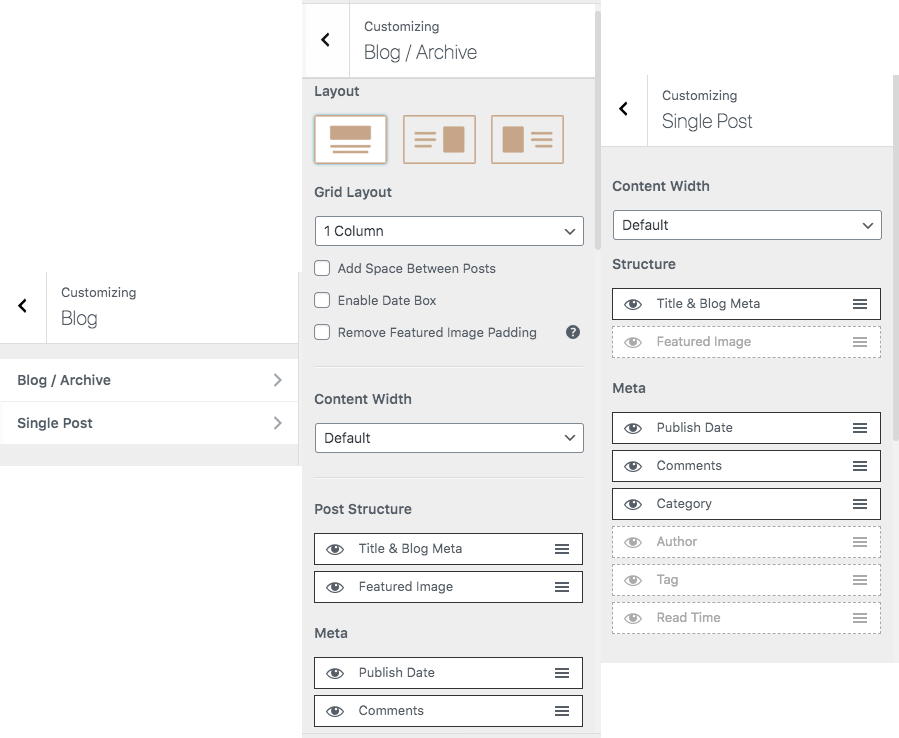
Apart from this, I like the notable design options, like
- Mega Menu
- Spacing Control
- Hooks & Filters
- LMS integration
- Sticky Header
- Scroll to the top link
Winner – Divi
Reason – Divi is the best theme to get an impressive site design! I have never seen such a wide range of design preferences and the complete control to do everything from scratch. When you start using the Divi theme, I’m sure you will become a professional web designer and be able to create elegant websites without any trouble.
#3 Fastest Theme – Divi Vs Astra Speed Comparison
Let’s see which fast-loading WordPress theme is best: Divi or Astra.
Divi
So, how fast is Divi? Well, let me share some viewpoints on this Divi Vs Astra battle!
Divi has historically struggled with performance, but Divi 5 introduces major architectural improvements that significantly improve loading speed and front-end efficiency.
Last year, it received a significant update to offer improved page load speed by optimizing the delivery of JavaScript, CSS, and Google Fonts. Now, it has advanced caching mechanisms to boost the Divi speed.
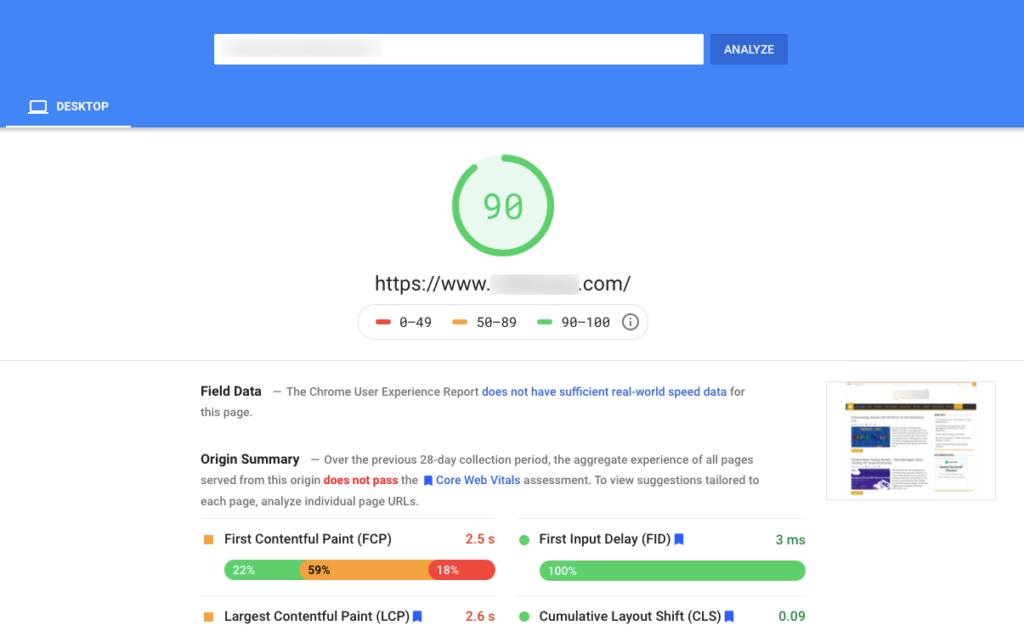
Check the speed score of my niche website designed with a Divi theme!
Astra
Astra was built as a lightweight theme and is widely known for its excellent Core Web Vitals performance. The theme loads minimal assets and gives users the flexibility to choose their preferred page builder.
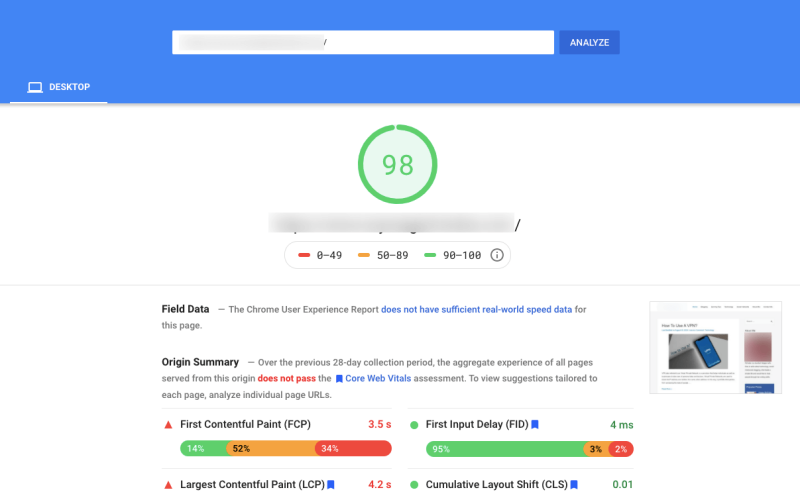
I’m satisfied with the speed score of my blog built with Astra, and yes, it is awe-inspiring. I didn’t work much on the speed optimization part. When Astra is combined with a reliable hosting provider, you will get excellent performance.
Look at my Astra theme speed!
Winner – Astra
Reason – Astra is weightless and makes a massive difference in the speed score, even without caching and removing render blocks. In most independent speed tests, Astra still performs better on a clean installation. However, the gap is much smaller than it was in previous years.
#4 SEO-Friendliness – Divi or Astra wins the SEO race?
Getting targeted visitors from the Google search engine is a blessing! Even though you are good at executing on-page SEO strategies, it’s healthier to buy a theme that is perfectly optimized for SEO.
If it is bloated with unclean code, getting high search engine rankings will be harder. Let’s look at Divi’s and Astra’s SEO-friendliness, and I’ll tell you which theme would help you achieve higher SERP rankings.
Divi
Let me answer the question: How SEO-friendly is Divi? Divi includes SEO features such as Schema Markup, proper site structure, excellent coding, and a breadcrumbs module to make your site accessible to search crawlers.
It has SEO settings for almost every page; however, you can use a WordPress SEO plugin like Yoast to fine-tune your site’s SEO. So, Divi is not bad for SEO when fixed, right? You need to improve site speed by implementing some optimizations.
Astra
Adding Schema Markup to every page of your website, Astra makes your site search engine-friendly. You may take it to the next level through their Schema Pro plugin. It also offers breadcrumbs for easier site navigation for a great user experience.
Moreover, it uses the default WordPress data and follows the standard coding to load faster. Optimized header structure and AMP compatibility are its other SEO-friendly features.
My SEO results are always good with this performance-focused theme. After switching over to Astra from MyThemeShop for my blog, MyMagicFundas, the organic keywords have doubled, and my organic traffic as well 🙂

Winner – Astra
Reason – Regarding SEO features like Schema Markup, Breadcrumbs, Quick Performance, Optimized Header Tags, Mobile Responsive, AMP, & Page Builder compatibility, Astra is superior to Divi. You can see that my search engine traffic improved after switching to the Astra WordPress theme.
#5 WooCommerce Compatible – Which Theme is apt to build online stores?
Creating an online store with WordPress is a wiser choice. However, picking an ideal theme with built-in WooCommerce support is hectic. You must evaluate its performance, mobile responsiveness, optimized cart and checkout pages, and conversion-friendly features. So, who is WooCommerce-friendly, Divi or Astra?
Divi
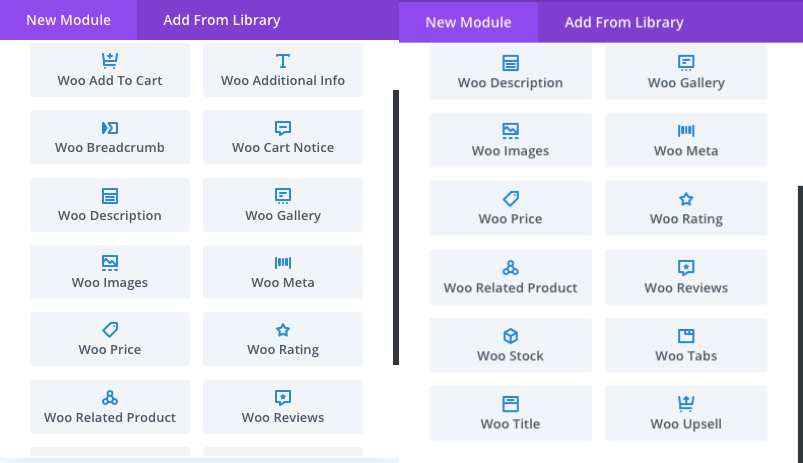
Divi is WooCommerce-compatible, so you can sell products anytime without additional cost. Not only does it offer pre-made templates, but it also offers 15+ new eCommerce modules through which you can take complete control over the product pages.
The Woobuilder for Divi takes WooCommerce to the next level. You just need to insert the modules as Woo Add to Cart, Woo Rating, Woo Meta, Woo Reviews, Woo Tables, Woo Upsell, & Woo Gallery and customize them according to your needs.
Astra
Astra is the best Woocommerce theme built to boost sales. Its incredible speed, code-free customizations, and secure platform make it the best fit to build an online store that sells more.
The pre-made eCommerce websites will help you set up the web stores in minutes, and their responsive design is optimized for mobile sales.
It has other exclusive features in its WooCommerce support, like
1. Infinite Scroll – When the user scrolls down, your products will get loaded for a seamless experience.
2. Grid Settings – Completely controlling the borders and buttons makes showcasing the product in a Grid design feasible.
3. Off-Canvas Sidebar – Add helpful filters and widgets to the sidebar and improve user experience.
4. Dropdown Cart – This consolidates the summary of the items added to the cart without reloading the page.
5. Sales Bubble Style – To grab the user’s attention and make the trades through the sales bubble.
6. Checkout Options – Instead of integrating the default traditional checkout, you may add an interactive one.
Winner – Both
#6 Customer Support – How Proficient & Active Are They?
The customer support team should be highly knowledgeable to resolve your design issues and should be easily reachable to fix things faster. In this Astra Vs Divi comparison, let me share my views about their customer support.
Divi
Divi offers premium support, with a team of experienced professionals to assist theme users. They are highly knowledgeable and easily reachable through the Live chat support system. You may also use their support forum to get help or watch instructional videos to overcome difficulties.
Until now, I have had no bitter experiences with the customer team, as they are always available to look into my concerns and deal with them through better solutions. Moreover, I never waited long to accept their assistance.
Astra
Like Divi, Astra also has a highly skilled team behind the scenes. They are ready to help you through the ticket system. They have generated an in-depth document to set up everything. If you have any doubts about fixing the elements, you can find helpful articles that may help you resolve your issues.
The biggest roadblock of Astra is that there’s no phone & chat support. However, communication with other users is possible through the Facebook community, and you can get help to solve your puzzles.
Winner – Divi
Reason: The Astra theme should include live support for immediate help. The ticket system is helpful, but not as active as Divi. You need to be patient when seeking assistance from the support team.
#7 Pricing – Astra or Divi: Which is Affordable & Value for Money?
The theme pricing package should be affordable and worth the money spent. Let’s see which company offers the best package and a reasonable pricing plan.
Divi
The highlight of Divi is that you can use its single license across multiple websites, and its lifetime pricing plan with a special discount is highly appreciable.
In the theme package, you will obtain permission to use the Extra theme, Bloom Email Optin, and the Monarch social media plugin, which can increase user interaction.
Divi offers two pricing plans: Yearly and Lifetime. Its lifetime pricing is a profitable deal as it is a one-time investment, and yes, you will receive updates and support forever. Don’t miss out on grabbing the Divi Discount Code now!

If you don’t like Divi’s performance, you may get your money back within 30 days!
Astra
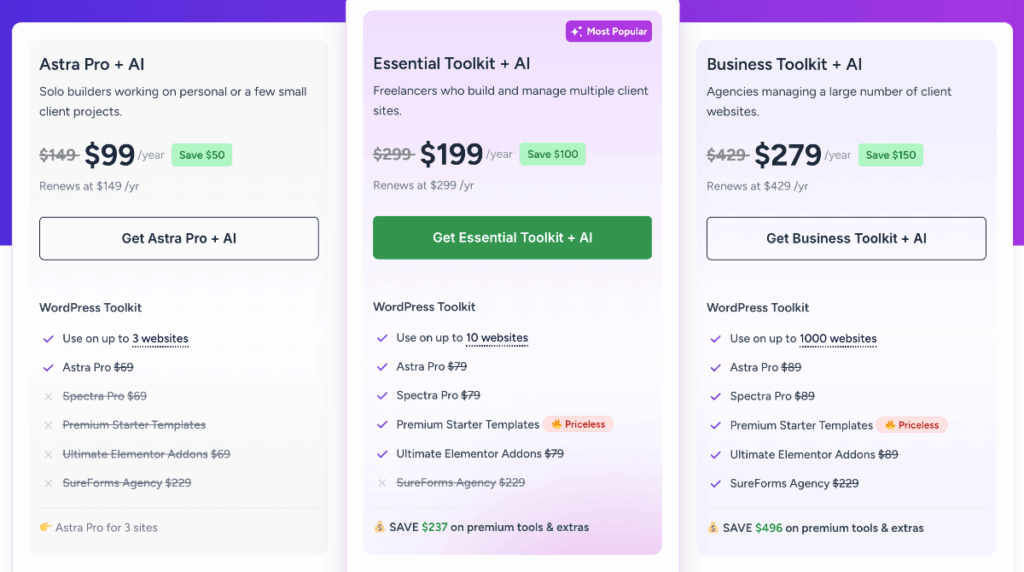
Astra contains three different pricing plans,
Astra Pro – Starting at $99/year, Astra Pro unlocks advanced design and customization features, making it ideal for bloggers, freelancers, and small businesses seeking greater creative control.
Essential Toolkit – Starting at $199/year, this plan includes Astra Pro, premium website templates, Spectra Pro, and powerful design tools to speed up website creation.
Business Toolkit – Starting at $279/year, the complete package for agencies and professionals, featuring advanced marketing, schema, lead-generation, and client management tools.
All plans support unlimited websites, AI, include premium support, and come with a 14-day money-back guarantee.
Its Lifetime deal is also available for those who don’t want to renew their subscription yearly.
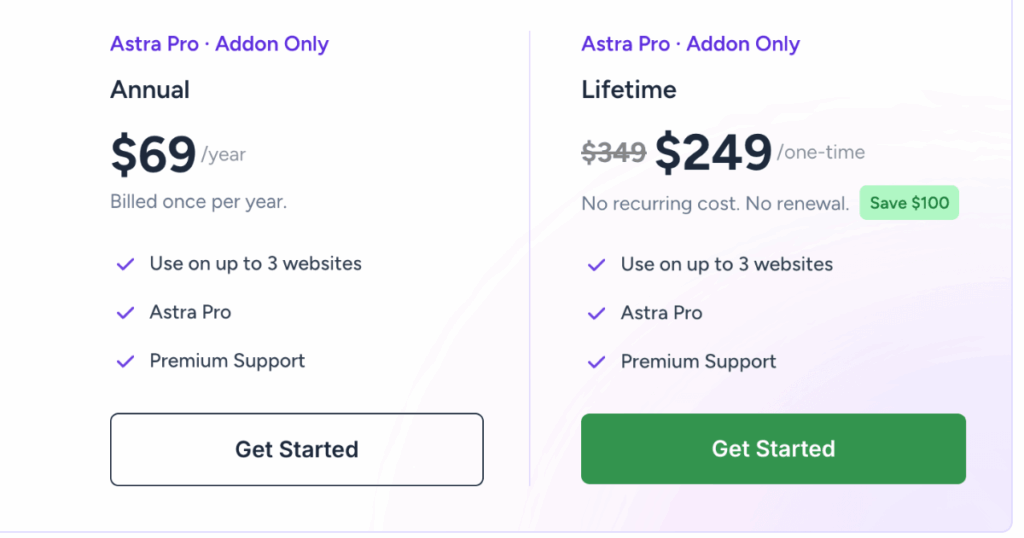
Winner – Divi
Reason – Divi is an all-in-one theme with the builder and other design, lead generation & marketing features. Its lifetime deal is the same as Astra, which has no page builder and other sophisticated features. Even though Divi’s annual pricing plan is a bit more expensive than Astra’s, it is highly affordable when you look more closely.
Unseen Features of Divi In Astra?
So, I have compared the common features available in both themes. Do you know that the Divi theme has some features that are hidden in Astra?
Divi has exceptional qualities you won’t find in the Astra theme. They are,
1. Page Builder
Divi is not just a WordPress theme. It’s an entire site-building platform that replaces the traditional WordPress editor with a sophisticated visual builder to make unique designs more efficient. When you don’t want to apply the pre-made designs and want to start everything from scratch, the Divi builder comes in handy.
The Divi page builder has the following qualities,
- Drag and drop builder
- Inline text editing
- Save & Manage your designs
- Global elements & styles
- Undo, redo, & revisions
- Shape dividers
- Border options
- Advanced code editing
- Filters & effects
- Drop & text shadows
- Animations
- Background video, images & colors
- Searchable & Filterable settings
- Quick page creation
2. Social Media Plugin
Having the best social media sharing plugin for WordPress, Monarch, and Divi takes your social sharing to the next level by placing the sharing buttons in 5 locations.
This plugin has a clean yet customizable design, allowing you to choose the shapes, colors, and hover effects for the buttons. This is a distinctive quality of the Divi theme!
3. Marketing Tools
Divi theme offers many marketing tools to tweak your presence in front of your competitors.
Email Optin – You can easily build your email subscribers through its email opt-in module, Bloom. Just create custom fields to build segmented lists or use pre-made templates to collect information from your subscribers. This GDPR-compliant lead-generation plugin for WordPress offers 6 display types to convert visitors into loyal followers. Bloom can be integrated with 19 different email marketing software.
Pricing Tables – If you have a sales page for your business product, it is a useful element for creating compelling pricing tables to boost product sales.
Contact Form – You have many design options to create a custom contact form and stay in communication with your audience.
A/B Split Testing – This unique feature of Divi boosts conversions by selecting the design that yields the best results.
FAQ – Astra Vs Divi Theme
Who wins the battle – Divi Vs Astra Speed?
When it comes to speed, Astra is the champion thanks to its lightweight design. The Divi theme is somewhat bulky because it includes the Divi builder and other design-control plugins.
Does the Astra theme support Divi?
Yes, the Astra theme can be customized using the Divi builder.
Other Divi Comparisons
Divi Or Astra – My Final Words
Both Divi and Astra are excellent WordPress themes, but you should pick the right one!
Choose Divi if you want an all-in-one visual website builder with advanced design controls, built-in marketing tools, and a large library of pre-designed layouts.
Choose Astra Pro if your priorities are website speed, Core Web Vitals, SEO performance, and compatibility with page builders like Elementor or Spectra.
- For bloggers, affiliate marketers, and content-focused websites, Astra is usually the better choice.
- For designers, agencies, and users who want maximum creative freedom without relying on third-party builders, Divi remains one of the strongest options available.
Ultimately, the best WordPress theme depends on your goals, technical preferences, and workflow.



A beneficial comparison post. I am a blogger and using WordPress for several years. I love using the WordPress themes for my blogs. I have already used the free version of ASTRA. I wanted to try out the DIVI theme for my upcoming blogs. I was able to learn the exciting features of the two WordPress themes through your post.
Good to know. A Great comparison post about DIVI vs ASTRA. It really helped me to learn about the features of WordPress themes.
It’s really worth-read, Absolutely help to set up my site.
Thanks for the wonderful article.
A beneficial comparison post. I am a blogger and using WordPress for several years. I love using the WordPress themes for my blogs. I have already used the free version of ASTRA. I wanted to try out the DIVI theme for my upcoming blogs. I was able to learn the exciting features of the two WordPress themes through your post.
Good that you are using Astra free version. I suggest you use the Premium and take your design skills to the next level. I’m using the same for my blog, its header & footer builder is awesome. Thanks for commenting!
Great read, while i like page builders because of the all included tools and fun to build a website with, i prefer speed because of google ranking and core vitals. specially for a webshop.
A difficult choice but i think i will go with speed “Astra”.